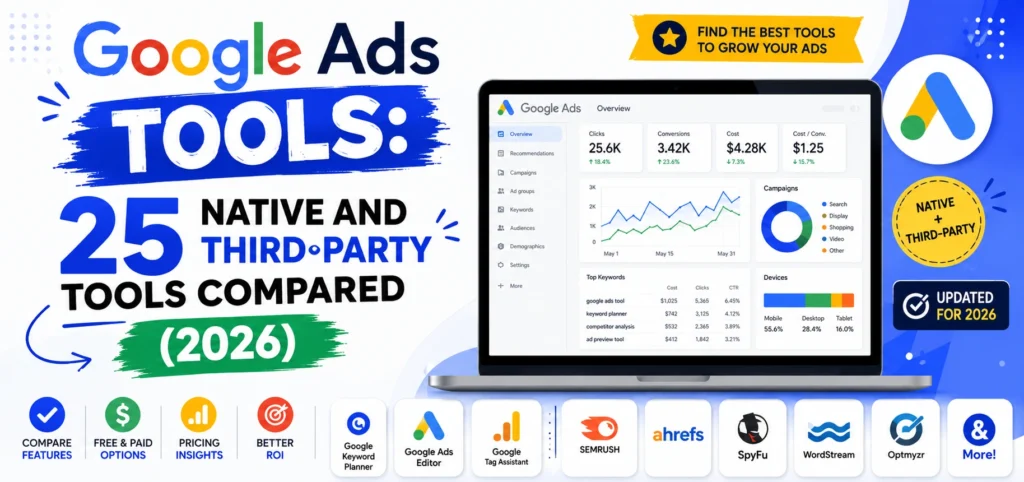
Most advertisers pay for Google Ads tools they do not need while ignoring the ones already sitting in their account. Google gives you roughly a dozen free tools inside the interface, and in my experience most accounts have never opened half of them.
This guide covers both. First the native tools built into Google Ads, which cost nothing and solve most problems. Then the third-party platforms, with real 2026 pricing and an honest answer on when your account is big enough to justify one. I have no affiliation with any tool listed here, which is worth saying because several of the pages ranking for this term are published by the software they recommend.
What Google Ads Tools Actually Are
Two distinct categories get mixed together constantly.
Native tools are built into your Google Ads account. They cost nothing beyond your ad spend, cover keyword research, forecasting, diagnostics, bulk editing, and competitive benchmarking, and they are documented in Google’s own overview of Ads tools. Nearly every advertiser underuses them.
Third-party tools sit on top of your account through the Google Ads API. They exist to solve problems the native interface handles poorly: managing many accounts at once, automating repetitive checks, catching waste before it compounds, and producing client-ready reporting. They start around $129 monthly and scale with your ad spend.
The practical rule: native tools handle the work. Third-party tools handle the scale. If you run one account under roughly $10,000 monthly spend, you almost certainly do not need to pay for anything.
Free Google Ads Tools Built Into Your Account
These are free with any Google Ads account. Listed roughly in order of how much value most advertisers leave on the table.
1. Google Ads Editor
What it does: A free desktop application for bulk editing campaigns offline, with changes posted back when you are ready.
Best for: Anyone managing more than one campaign.
Cost: Free.
Why it matters: This is the most underused tool Google publishes. Building 200 keywords in the web interface takes an afternoon. In Editor it takes minutes, with find-and-replace, bulk append, and copy-paste between accounts. If you learn one tool on this list, learn this one.
2. Keyword Planner
What it does: Generates keyword ideas with search volume ranges, competition levels, and top-of-page bid estimates.
Best for: Building initial keyword lists and forecasting cost.
Cost: Free with a Google Ads account.
Why it matters: It is Google’s own volume data rather than a third-party estimate. One caveat worth knowing: accounts with no active spend see broader volume ranges instead of precise figures.
3. Search Terms Report
What it does: Shows the actual queries that triggered your ads, as opposed to the keywords you bid on.
Best for: Finding wasted spend and building negative keyword lists.
Cost: Free.
Why it matters: This is where the money leaks. Broad match and Performance Max both pull queries you never intended to buy. Reviewing this weekly and adding negatives is the highest-return hour in PPC management, and it requires no software beyond the interface.
4. Auction Insights
What it does: Shows which advertisers compete in your auctions, with impression share, overlap rate, and outranking share.
Best for: Understanding competitive pressure and diagnosing sudden performance drops.
Cost: Free.
Why it matters: When CPCs rise abruptly, this tells you whether a new competitor entered or your Quality Score slipped. Most advertisers guess at that answer instead of checking.
5. Performance Planner
What it does: Forecasts how conversions and cost would change at different budget levels, using your account’s own historical data.
Best for: Budget planning and justifying spend increases internally.
Cost: Free.
Why it matters: It answers the question every client and finance team asks: what happens if we spend more. Treat forecasts as directional rather than precise, since they assume market conditions hold.
6. Ad Preview and Diagnosis
What it does: Shows how your ad appears for a given search in a chosen location and device, without generating an impression.
Best for: Checking ads without polluting your own impression data.
Cost: Free.
Why it matters: Repeatedly googling your own keywords inflates impressions and depresses click-through rate, which feeds into Quality Score. This tool exists precisely so you stop doing that.
7. Change History
What it does: Logs every change made to the account, by whom and when, going back years.
Best for: Diagnosing why performance shifted on a specific date.
Cost: Free.
Why it matters: Overlay change history on a performance graph and most unexplained drops explain themselves. It is also the first thing to check when you inherit an account from another agency.
8. Recommendations and Optimization Score
What it does: Suggests changes and scores your account against Google’s view of best practice.
Best for: Spotting genuine setup gaps.
Cost: Free.
Why it matters: Useful with a firm caveat. Some recommendations, particularly broad match expansion and budget increases, serve Google’s revenue as much as your performance. Apply the technical fixes, ignore the pressure to raise budgets, and never enable auto-apply on a live account.
9. Google Ads Scripts
What it does: Runs JavaScript against your account to automate reporting, alerting, and bulk changes.
Best for: Advertisers who want automation without paying for it.
Cost: Free.
Why it matters: This is the free version of what third-party platforms charge for. Plenty of open-source scripts exist for budget pacing alerts, broken URL checks, and n-gram search term analysis. It requires some technical confidence, and it replaces a subscription.
10. Insights Page
What it does: Surfaces demand trends, rising search interest, and audience insights specific to your account.
Best for: Spotting seasonal shifts before competitors act on them.
Cost: Free.
Why it matters: It combines Google Trends data with your own performance, which is context no external tool has.
11. Reach Planner
What it does: Forecasts reach, frequency, and cost for YouTube and Display campaigns.
Best for: Planning video and awareness campaigns.
Cost: Free.
Why it matters: Video budgets are usually set by guesswork. This produces a defensible plan before you commit.
12. Portfolio Bid Strategies
What it does: Applies one automated bid strategy across multiple campaigns sharing a goal.
Best for: Accounts where individual campaigns have too little conversion data to optimise alone.
Cost: Free.
Why it matters: Smart Bidding needs volume. Pooling campaigns gives the algorithm enough signal to work, which is often the difference between automated bidding helping and hurting.
13. Google Ads Mobile App
What it does: Monitoring, alerts, and quick edits from your phone.
Best for: Catching a disapproved ad or a budget spike outside working hours.
Cost: Free.
Why it matters: It is a monitoring tool, not a management tool. Useful for stopping problems, not for optimisation.
Free Third-Party Tools Worth Adding
None of these cost anything and all of them fill genuine gaps.
14. Google Analytics 4
What it does: Tracks what happens after the click, including conversions, revenue, and multi-channel paths.
Cost: Free.
Why it matters: Google Ads reports conversions its own way. GA4 gives you a second view and shows which campaigns produce customers rather than just conversions.
15. Google Tag Manager
What it does: Deploys conversion tracking and remarketing tags without editing site code.
Cost: Free.
Why it matters: Broken conversion tracking is the single most common serious problem in PPC accounts. Tag Manager makes it fixable without a developer.
16. Microsoft Clarity
What it does: Unlimited free heatmaps and session recordings.
Cost: Free, permanently, with no paid tier.
Why it matters: Your landing page determines whether paid traffic converts. Watching ten real sessions from paid visitors usually explains a weak conversion rate faster than any account-level analysis.
17. Google Merchant Center
What it does: Manages product feeds for Shopping and Performance Max campaigns.
Cost: Free.
Why it matters: For ecommerce, feed quality determines Shopping performance more than bids do. Titles, images, and attribute completeness are the levers.
18. Looker Studio
What it does: Builds custom dashboards blending Google Ads, GA4, Search Console, and spreadsheets.
Cost: Free.
Why it matters: It replaces paid reporting software entirely for most advertisers, and client-ready dashboards update themselves.
19. ROAS and CPM Calculators
What it does: Models return on ad spend and cost per thousand impressions before you commit budget.
Cost: Free.
Why it matters: Deciding whether a campaign can be profitable is arithmetic you should do before spending, not after. A free ROAS calculator tells you the return you need at your margin, which sets the maximum CPA your bidding strategy should target.
20. Free Account Graders
What it does: Audits your account and scores it on wasted spend, impression share, Quality Score, and structure.
Cost: Free, though most require an email address.
Why it matters: Useful as a second opinion, particularly on an inherited account. Treat the scores as directional, since these tools are lead generation for the vendors publishing them.
Paid Google Ads Management Tools and What They Cost
Prices verified as of publication and scale with managed ad spend.
21. Optmyzr
What it does: Rule-based automation, custom scripts, budget pacing, search term analysis, and client reporting across many accounts.
Cost: From roughly $209 to $249 monthly for smaller spend levels, rising substantially above $10,000 managed spend, with enterprise plans well beyond $1,000.
Best for: Agencies and in-house teams managing multiple accounts with real PPC expertise on staff.
Why it matters: The deepest Google Ads optimisation platform available, and the Rule Engine lets an experienced manager scale their own methodology across accounts. The honest limitation: it accelerates your team’s work, it does not replace it. Small businesses without a skilled operator rarely justify the cost.
22. Adalysis
What it does: Automated ad testing, Quality Score tracking, and account health diagnostics for Google Ads specifically.
Cost: From around $129 monthly, with a 30-day free trial.
Best for: Data-oriented PPC managers who want testing frameworks without Optmyzr’s complexity.
Why it matters: Many practitioners rate its search term analysis above Optmyzr’s, and it costs roughly half as much. The trade is narrower scope, since it is Google Ads only.
23. Opteo
What it does: Scans your accounts daily and delivers a ranked list of specific recommendations with supporting data, applied with one click.
Cost: From around $129 monthly.
Best for: Small businesses and lean teams wanting a second pair of eyes rather than an automation platform.
Why it matters: It takes the opposite approach to Optmyzr. Instead of building rules, you get concrete suggestions such as adding a specific negative keyword or adjusting a specific budget. Far easier to adopt if PPC is not your full-time job.
24. TrueClicks
What it does: Continuous automated auditing, flagging waste, setup errors, and missed opportunities.
Best for: Agencies wanting a quality control layer across a portfolio.
Why it matters: It focuses on catching problems rather than optimising performance, which makes it complementary to the tools above rather than an alternative.
25. Competitor Research Platforms
What it does: Semrush, SpyFu, and similar tools reveal which keywords competitors bid on, their estimated spend, and their ad copy history.
Cost: Typically $99 to $250 monthly.
Best for: Entering a competitive market or diagnosing why costs rose.
Why it matters: Auction Insights tells you who you compete against. These tell you what those competitors are doing. Estimates are directional rather than exact, so treat the numbers as signals not facts.
When You Actually Need a Paid Google Ads Tool
Three honest thresholds. Below all of them, native tools plus free additions cover you completely.
Managed spend above roughly $10,000 monthly. Below this, the efficiency a paid tool recovers rarely exceeds its cost. Above it, a two percent waste reduction pays for the subscription several times over.
More than five accounts. Managing five accounts through the native interface is workable. Managing fifteen is not, and this is the strongest single argument for third-party software.
Client reporting that native exports cannot produce. If you are rebuilding the same spreadsheet monthly for several clients, that time has a salary cost. Looker Studio solves much of this free, so exhaust it before subscribing.
One threshold that does not justify a paid tool: wanting better performance. No software fixes a weak offer, a poor landing page, or broken conversion tracking. Those are the three most common causes of underperforming accounts, and all three are free to fix.
Which Google Ads Tools to Use by Account Size
Under $2,000 monthly spend, one account: Google Ads interface, Editor, Search Terms Report, Keyword Planner, GA4, Tag Manager, Microsoft Clarity. Cost: nothing. This genuinely covers everything.
$2,000 to $10,000, one or two accounts: Add Auction Insights, Performance Planner, Looker Studio for reporting, and Google Ads Scripts for budget alerts. Still free. Consider Opteo if nobody on the team is a PPC specialist.
$10,000 to $50,000: Adalysis or Opteo at around $129 monthly, plus everything above. Add competitor research if you are in a contested market.
Above $50,000 or five or more accounts: Optmyzr or equivalent, plus a reporting layer. At this level the subscription is a rounding error against spend.
Agency portfolio: Optmyzr or Adalysis for optimisation, TrueClicks for quality control, Looker Studio for client dashboards. How this fits alongside your SEO, social, and analytics stack is covered in our comparison of the best digital marketing tools with real pricing.
What We Have Learned Managing Google Ads Accounts at Leemjaz
A few things from accounts we have run and inherited.
Most accounts do not need software. They need the Search Terms Report opened. The majority of inherited accounts we audit have never had a systematic negative keyword process. The waste sitting in that report typically exceeds what any tool subscription would cost, and finding it requires nothing but an hour and the native interface.
Google Ads Editor pays back the learning curve in a week. We build every new account in Editor rather than the web interface. What takes a day online takes an hour offline, and the offline draft means mistakes never go live.
Auto-apply recommendations cause more problems than they solve. We have inherited accounts where auto-apply quietly switched keywords to broad match and spend went to queries with no commercial intent. Review recommendations manually. The technical ones are often worth applying. The expansion ones usually are not.
Check conversion tracking before touching anything else. On new accounts we audit tracking first, and it is broken or double-counting more often than people expect. Optimising toward inaccurate conversion data makes performance worse while the dashboard says it is improving.
The landing page is usually the constraint, not the campaign. We install Microsoft Clarity on every paid landing page before making bid changes. Watching real sessions has repeatedly found the actual problem faster than account-level analysis: a form failing on mobile, a price appearing above the value proposition, a button nobody scrolled far enough to see. This is why our PPC management work always starts with what happens after the click rather than with bids.
Google Ads Tools FAQs
What are the best free Google Ads tools?
Google Ads Editor is the most valuable, since it makes bulk campaign changes take minutes rather than hours. The Search Terms Report is the highest-return free tool for cutting waste, and Keyword Planner, Auction Insights, Performance Planner, and Ad Preview and Diagnosis are all free inside your account. Outside Google Ads, add Google Analytics 4, Tag Manager, Microsoft Clarity for landing page insight, and Looker Studio for reporting. Together these cover most advertisers completely.
Do I need a third-party Google Ads tool?
Probably not below $10,000 monthly managed spend on a single account, because the efficiency gained rarely exceeds the subscription cost. Paid tools become worthwhile at three thresholds: spend above roughly $10,000, more than five accounts to manage, or client reporting that native exports and Looker Studio cannot produce. Wanting better performance is not a valid trigger, since no software fixes a weak offer, a poor landing page, or broken conversion tracking.
How much do Google Ads management tools cost?
Adalysis and Opteo both start around $129 monthly. Optmyzr starts at roughly $209 to $249 monthly for smaller spend levels and scales significantly once managed spend passes $10,000, with enterprise tiers exceeding $1,000. Competitor research platforms like Semrush and SpyFu run $99 to $250 monthly. Nearly all of these price by managed ad spend or account count, so quote the tier you will need in six months rather than today.
Is Google Keyword Planner free?
Yes. It is free with any Google Ads account and does not require active spend. The one limitation is that accounts with no spending history see search volumes as broad ranges rather than specific numbers. Running even a small campaign unlocks more precise data. For cross-checking volumes without an Ads account, Google Search Console and Google Trends are both free alternatives.
What is Google Ads Editor and why should I use it?
Google Ads Editor is a free desktop application that lets you make bulk changes to campaigns offline and then post them to your live account. It is the fastest way to build campaigns, apply find-and-replace across ad copy, add keywords in volume, and copy structures between accounts. Because you work offline and review before posting, mistakes never go live. For anyone managing more than one campaign, it is the single highest-value free tool Google publishes.
What is the best Google Ads tool for a small business?
The native interface plus Google Ads Editor, and nothing paid. Most small accounts underperform because of untracked conversions, weak landing pages, or wasted spend visible in the Search Terms Report, and no third-party subscription fixes any of those. If nobody on the team is a PPC specialist and you want a second opinion, Opteo at around $129 monthly delivers plain recommendations without the complexity of a full automation platform.
Conclusion
The best Google Ads tools for most advertisers are the ones already sitting in the account, unopened. Editor, the Search Terms Report, Auction Insights, and Change History solve the majority of real problems, and they cost nothing. Paid platforms earn their place at scale, when the accounts multiply and the manual checks stop being feasible. Before you get there, the higher-return move is almost always to open the free tools properly rather than to buy another subscription.