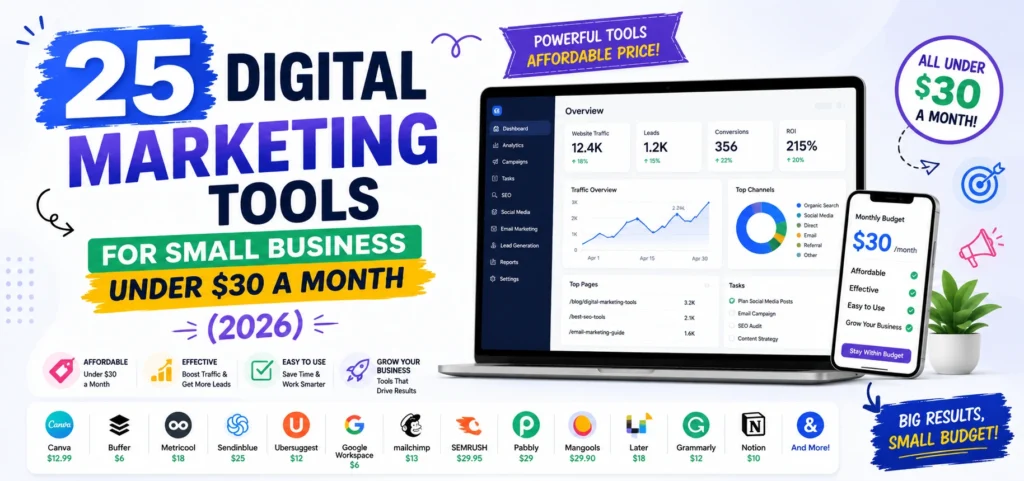
Most lists of digital marketing tools for small business are written for companies that are not small. They recommend software at $99 to $199 monthly to businesses running their entire marketing budget on $300, then wonder why nobody adopts it.
This list is built the other way around. Every tool below is free or under $30 monthly, prices are verified, and at the end I have totalled what a complete working stack actually costs. I have also included a section on the tools small businesses are commonly told to buy and should not, because avoiding two wrong subscriptions saves more than finding one right one.
What Digital Marketing Tools a Small Business Actually Needs
Five jobs. Everything else is optional until these are covered.
- Measurement. Knowing what brings customers, not just traffic.
- Visibility. Being findable in search and maps when someone looks for what you sell.
- Content. Producing something worth publishing without a designer.
- Distribution. Getting it in front of people consistently.
- Retention. Owning a way to reach past customers directly.
Notice what is missing: automation platforms, CRMs with pipeline forecasting, listening tools, and attribution software. Those solve problems small businesses do not have yet, and buying them early is how marketing budgets disappear without producing customers.
Free Digital Marketing Tools Every Small Business Should Install First
These cost nothing permanently and cover more ground than most paid software.
1. Google Business Profile
What it does: Controls how you appear in Google Maps and the local pack, including hours, photos, posts, reviews, and messaging.
Cost: Free.
Best for: Any business with a location or service area.
Why it is worth it: For local businesses this outperforms almost everything else here. A complete profile with recent photos and steady reviews affects local pack placement more than most on-site SEO work. Claim it at Google Business Profile before touching anything else.
2. Google Search Console
What it does: Shows which searches bring people to your site, your click-through rate, and any indexing problems.
Cost: Free, with no query caps.
Best for: Anyone with a website.
Why it is worth it: It is first-party data straight from Google. Filtering to queries where you rank between positions 8 and 20 gives you a list of pages that need small improvements rather than new content, which is the cheapest traffic available anywhere.
3. Google Analytics 4
What it does: Tracks what visitors do after arriving, including conversions and revenue by source.
Cost: Free.
Best for: Working out which marketing actually produces customers.
Why it is worth it: Without it you are judging channels by traffic volume, which correlates poorly with revenue. GA4 is the difference between marketing and guessing.
4. Microsoft Clarity
What it does: Unlimited heatmaps and session recordings showing exactly how people use your pages.
Cost: Free permanently, with no paid tier at all.
Best for: Understanding why a page is not converting.
Why it is worth it: Competitors charge $30 to $300 monthly for this. Watching ten real sessions usually reveals the problem faster than any dashboard: a form failing on mobile, a button below the fold, a price appearing before the value.
5. Meta Business Suite
What it does: Native scheduling, inbox, and insights for Facebook and Instagram.
Cost: Free, unlimited.
Best for: Businesses whose social presence is those two platforms.
Why it is worth it: It is unlimited because Meta owns the platform. If Facebook and Instagram are your whole social strategy, you can skip paid scheduling software entirely.
6. Canva
What it does: Design with templates preset to correct dimensions, basic video editing, and a free content planner that schedules to social.
Cost: Free tier is genuinely usable.
Best for: Every small business without a designer.
Why it is worth it: The highest-value free tool on this list. Most users never discover the content planner, which means they pay for a scheduler they did not need.
7. Google Tag Manager
What it does: Installs tracking and conversion codes without editing site code.
Cost: Free.
Best for: Anyone running ads or tracking conversions.
Why it is worth it: Broken conversion tracking is the most common serious problem in small business marketing. This makes it fixable without a developer.
8. Free Marketing Calculators
What it does: Models return on ad spend, ROI, and cost per thousand impressions before you commit budget.
Cost: Free.
Best for: Deciding whether a campaign can be profitable before running it.
Why it is worth it: Small budgets punish guesswork. Running the numbers first is free, and a set of free marketing calculators tells you the return you need at your margin, which sets the maximum you can afford to pay per customer.
Affordable SEO Tools for Small Business
The category where overspending happens most.
9. Ahrefs Webmaster Tools
What it does: Site audit and backlink data from Ahrefs’ full index, for domains you own and verify.
Cost: Free forever, no credit card, 5,000 crawl credits monthly.
Best for: Monitoring your own site’s technical health and backlinks.
Why it is worth it: Ahrefs has not offered a conventional free trial since 2022, so this is the only free access to their data. You cannot research competitors with it, which is the trade for free.
10. Google Keyword Planner
What it does: Search volume ranges and keyword ideas from Google’s own data.
Cost: Free with a Google Ads account, no spend required.
Best for: Validating whether a topic has demand.
Why it is worth it: Third-party volume estimates can differ substantially from Google’s own figures. This is the number to check against.
11. Mangools
What it does: Keyword research, SERP analysis, rank tracking, and backlink checking in one clean interface.
Cost: From around $29 monthly.
Best for: Small businesses wanting one paid SEO tool rather than five free ones.
Why it is worth it: It does roughly 70 percent of what Ahrefs does for under a third of the price, and it is considerably easier to learn. If you buy one SEO tool, this is the sensible choice at small business scale.
12. Ubersuggest
What it does: Keyword ideas, site audit, and competitor data.
Cost: Free tier limited to 3 searches daily, paid from around $29 monthly.
Best for: Beginners learning keyword research.
Why it is worth it: The free tier is now tight enough to be a demo rather than a tool, and its volume estimates can vary noticeably from Keyword Planner. Serviceable at the paid tier, though Mangools is generally the better buy at the same price.
13. Screaming Frog SEO Spider
What it does: Crawls your site surfacing broken links, redirect chains, duplicate titles, and missing meta descriptions.
Cost: Free for up to 500 URLs, which covers most small business sites entirely.
Best for: Technical audits.
Why it is worth it: The free version exports data, which most free tools block. For a site under 500 pages it does essentially everything the paid version does.
14. Google Trends and AlsoAsked
What it does: Trends shows search interest over time and seasonality. AlsoAsked maps People Also Ask questions into a branching tree.
Cost: Both free, AlsoAsked with a small daily search limit.
Best for: Content planning and finding question-based topics.
Why it is worth it: Question content is what gets pulled into featured snippets and AI answers, and AlsoAsked shows the question hierarchy that becomes your heading structure.
Affordable Social Media Tools for Small Business
15. Buffer
What it does: Cross-platform scheduling with basic analytics and a link-in-bio page.
Cost: Free for 3 channels with 10 queued posts each, then roughly $5 to $6 per channel monthly.
Best for: Solo operators and B2B businesses.
Why it is worth it: One of the few free plans covering both LinkedIn and X, which several competitors exclude. Per-channel pricing is the cheapest model when you run three or four profiles.
16. Metricool
What it does: Scheduling plus genuinely strong analytics and competitor tracking across 11 platforms.
Cost: Free tier, then around $18 monthly billed annually for up to five brands.
Best for: Businesses that want analytics and scheduling in one place.
Why it is worth it: The best analytics in this price band by a clear margin. One caveat: the free plan excludes LinkedIn and X, so B2B businesses need the paid tier. Which pricing model suits you depends on how you grow, and the differences between social media marketing tools and their pricing structures matter more than the feature lists.
17. Publer
What it does: Scheduling, post recycling, watermarking, and a link-in-bio page.
Cost: Free for 3 accounts, then from around $5 per account monthly.
Best for: Budget-conscious businesses wanting maximum features per dollar.
Why it is worth it: The most generous feature set at the lowest entry price. X is excluded from the free tier.
18. Zoho Social
What it does: Scheduling, monitoring, and reporting with native CRM integration.
Cost: From around $10 monthly.
Best for: Businesses already using other Zoho products.
Why it is worth it: Cheapest credible paid option with a real CRM behind it. Standalone value is thinner if Zoho is not already in your stack.
Affordable Email Marketing Tools for Small Business
Read this section carefully, because the common advice is now out of date.
19. Brevo
What it does: Email campaigns, automation, signup forms, plus SMS and WhatsApp on most tiers.
Cost: Free plan sends 300 emails daily, roughly 9,000 monthly, with unlimited contacts and automation for up to 2,000 contacts. Paid from around $9 monthly for 5,000 emails.
Best for: Small businesses with a growing list who send regularly.
Why it is worth it: It prices by emails sent rather than contacts stored, which is dramatically cheaper for businesses with large lists that email infrequently. The free plan is the most generous available. Note that removing Brevo branding requires a paid add-on.
20. MailerLite
What it does: Email campaigns, automation, A/B testing, and landing pages.
Cost: Free for 500 subscribers and 12,000 emails monthly with automation included. Paid from around $12 monthly.
Best for: Creators and small businesses wanting the cleanest interface.
Why it is worth it: Automation and landing pages on a free plan is rare. Worth knowing it halved its free subscriber limit from 1,000 to 500 in September 2025, so check the current figure before building a list around it.
21. Mailchimp
What it does: Email marketing with strong templates and integrations.
Cost: Free plan now caps at 250 contacts and 500 emails monthly, with automation removed in June 2025. Paid tiers price by contact count.
Best for: Businesses already invested in its ecosystem.
Why it is worth it: Honestly, for most small businesses starting now, it is not the right choice. The free plan is far weaker than it was, and contact-based pricing gets expensive as lists grow. Almost every list still recommends it by default. Start with Brevo or MailerLite instead.
Affordable Content and Design Tools
22. Canva Pro
What it does: Brand kit with locked fonts and colours, background remover, and one-click resize across formats.
Cost: Around $15 monthly.
Best for: Any business producing more than a few graphics weekly.
Why it is worth it: Resize alone justifies it. Adapting one campaign across five platforms goes from an hour to a minute.
23. CapCut
What it does: Vertical video editing with auto-captions, transitions, and trending audio.
Cost: Free, with a Pro tier.
Best for: Reels, TikToks, and Shorts.
Why it is worth it: Auto-captions matter more than the editing. Most social video is watched without sound, and captioned video holds attention considerably longer.
24. Hemingway Editor and Grammarly Free
What it does: Flags long sentences, passive voice, and grammar errors before publishing.
Cost: Both free at the level a small business needs.
Best for: Anyone writing their own website copy and blog posts.
Why it is worth it: Not a substitute for good writing, but reliably catches the sentences readers abandon and the typos that undermine credibility.
25. HubSpot Free CRM
What it does: Contact management, deal pipeline, email tracking, and forms.
Cost: Free for unlimited users.
Best for: Small businesses tracking leads in a spreadsheet.
Why it is worth it: The free CRM is genuinely good and genuinely free. Be clear that this is separate from HubSpot Marketing Hub, which is a very different proposition covered below.
What a Complete Small Business Marketing Stack Costs
Here is the whole thing, totalled.
Starter stack, $0 monthly. Google Business Profile, Search Console, GA4, Microsoft Clarity, Canva free, Meta Business Suite, Brevo free, Ahrefs Webmaster Tools, Screaming Frog free, Google Keyword Planner. This is a complete, functioning marketing operation at zero software cost.
Growth stack, roughly $45 to $60 monthly. Everything above plus Canva Pro at $15, Mangools at $29, and either Buffer or Metricool at $6 to $18. This is where most small businesses should land.
Serious stack, roughly $90 to $120 monthly. Add a paid email tier at $9 to $12, a second social channel or brand, and Zoho Social or similar if you need CRM integration.
If your marketing tool spend exceeds $150 monthly and you are a small business, something in the stack is priced for a company larger than yours.
Digital Marketing Tools Small Businesses Should Not Buy
Five common recommendations that waste small budgets.
Ahrefs at $99 monthly and Semrush at around $140. Both are excellent. Neither is right at small business scale. Mangools at $29 covers the majority of what you will actually use, and Ahrefs Webmaster Tools gives you your own site’s data free.
SE Ranking, which repriced its entry plan to around $129 monthly in 2026, moving it out of the small business bracket it used to occupy.
Sprout Social at $199 per seat and Hootsuite at $99 monthly. Both are built for teams with governance requirements. A business posting four times weekly across three channels is paying for approval workflows nobody will use.
HubSpot Marketing Hub. The free CRM is excellent. The paid Marketing Hub is priced for companies with a marketing department, and the tier that includes what most people want costs several hundred monthly.
Any all-in-one platform promising to replace six tools. They typically do one job well and five adequately, and you end up paying a premium for the five you then supplement anyway.
When your business genuinely outgrows this list, the full range and what each tier actually delivers is covered in our comparison of the best digital marketing tools with real pricing.
Which Tool to Buy First
Order matters when budget is tight.
- Nothing. Install the free stack completely and run it for 60 days. Most businesses discover they need less than they assumed.
- Canva Pro at $15. The first upgrade worth paying for, because it removes a daily time cost rather than adding a capability.
- A scheduler at $6 to $18, once you exceed three channels or find yourself posting manually every morning.
- Mangools at $29, once you are producing content regularly and need to know what to write about next.
- A paid email tier at $9 to $12, once your list passes the free plan’s cap. By that point it is paying for itself.
Buy in that order and you never pay for capacity before you need it.
What We Have Learned Setting Up Small Business Stacks at Leemjaz
A few patterns from clients we have onboarded.
Nearly every business arrives paying for something unused. The most common are a scheduler bought before there was content to schedule, and an SEO platform bought before anyone had time to act on its data. We audit subscriptions before recommending anything, and the first month frequently saves more than it costs.
The free tools are not installed properly. Search Console connected but never opened, GA4 tracking without conversions configured, Google Business Profile claimed years ago and never updated. Fixing these produces more measurable improvement than any new subscription, and it costs nothing.
We run every new client on free tiers for the first 30 days deliberately. It establishes real usage rather than assumed usage. The answer is often that a $29 tool covers them rather than the $129 one they were about to buy, and you cannot know that in advance.
Email is the most underused channel at this size. Small businesses spend on social where an algorithm decides who sees them, and ignore the list they own outright. Brevo’s free tier costs nothing and sends 9,000 emails monthly, and for most local businesses it produces more repeat revenue than any social platform.
Consistency beats tooling every time. We have seen businesses with a $500 monthly stack outperformed by competitors using free tools and posting reliably. Software removes friction. It does not create effort.
Digital Marketing Tools for Small Business FAQs
What digital marketing tools does a small business actually need?
Five jobs need covering: measurement, search visibility, content creation, distribution, and email. Google Search Console, Google Analytics 4, Google Business Profile, Canva, and a free email platform cover all five at zero cost. Everything beyond that is convenience rather than capability.
How much should a small business spend on marketing tools per month?
Most should spend nothing for the first two months, then $45 to $60 monthly once free tiers start limiting them. A complete working stack costs around $50: Canva Pro at $15, an SEO tool at $29, and a scheduler at $6 to $18. If you are above $150 monthly, something in your stack is priced for a larger company.
Can I run small business marketing with only free tools?
Yes, and many businesses do it successfully for years. Free tools cover analytics, local visibility, design, scheduling, email, and technical SEO completely. What they cannot replace is your time, since no tool writes content, answers customers, or interprets data for you.
Is Mailchimp still a good choice for small business email?
For most businesses starting now, no. Its free plan caps at 250 contacts and 500 emails monthly and removed automation in June 2025, and paid tiers charge by contact count, which gets expensive as lists grow. Brevo’s free plan sends around 9,000 emails monthly with automation included, and MailerLite allows 500 subscribers with automation and landing pages.
What is the best cheap alternative to Ahrefs or Semrush?
Mangools at around $29 monthly is the strongest paid option at small business scale, delivering most of what you will realistically use for under a third of the price. For free, combine Ahrefs Webmaster Tools for your own site’s backlinks, Google Search Console for query data, and Google Keyword Planner for volumes. The gap is competitor research, which free tools genuinely cannot cover.
Which marketing tool should a small business buy first?
Canva Pro at around $15 monthly, because it removes daily friction rather than adding a capability you then have to learn. Buy a scheduler second, once you exceed three channels, and an SEO tool third, once you are publishing regularly. Buy an email tier last, when your list outgrows the free cap and it is already paying for itself.
Conclusion
The best digital marketing tools for small business are the ones you open every week. A $500 stack used occasionally loses to a free stack used consistently, every time. Install the free foundation properly, run it for two months, and let your own limits tell you what to buy. That approach costs nothing, takes an afternoon to set up, and prevents the far more expensive mistake of paying for software built for a company ten times your size.