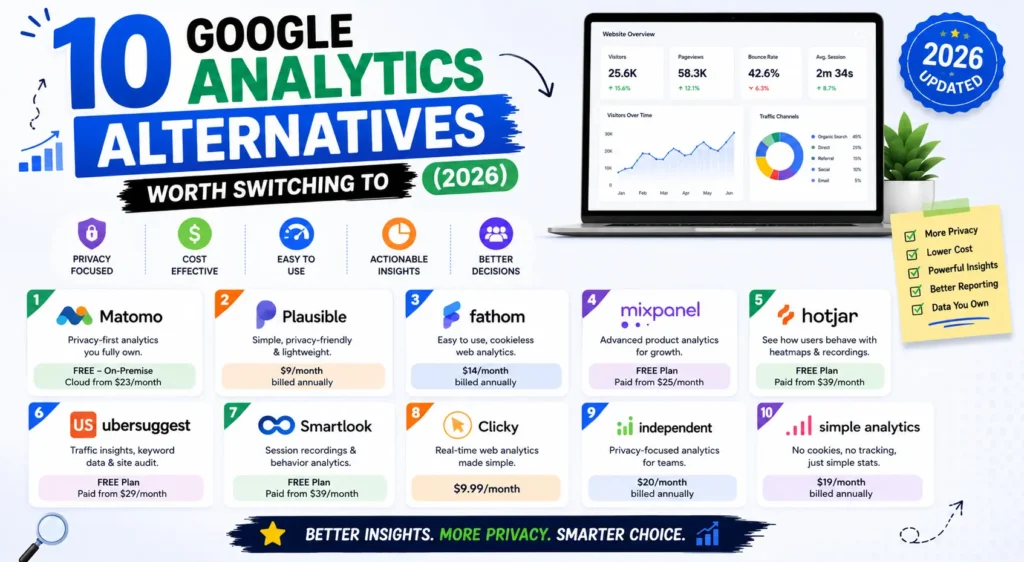
Most guides to Google Analytics alternatives skip the part that matters most: you probably cannot leave GA4 entirely, and understanding why changes which tool you should pick.
This guide covers ten Google Analytics alternatives with verified 2026 pricing, the specific documented limits that push teams away from GA4, and the one function no alternative replaces. No affiliate links and no sponsored placements, which is worth stating because a majority of the pages ranking for this term are published by tools that appear in their own rankings.
Why People Look for Google Analytics Alternatives
Four concrete problems, not vague privacy concerns.
Reports are sampled at scale. Standard GA4 properties sample reports above 10 million events per query. Analytics 360 raises that ceiling to 100 million. On a busy site, the free tier is estimating your numbers rather than counting them.
Data retention caps at 14 months. Standard properties delete event data after that window, where 360 extends to 50 months. Year-over-year analysis on a free property is genuinely difficult.
Ad blockers strip the script. Estimates suggest 30 to 40 percent of developer-heavy audiences block GA entirely. If your visitors are technical, your traffic numbers are meaningfully understated.
The interface fights you. GA4’s event-driven model is powerful and unintuitive. Answering a question as simple as which blog posts performed best takes more clicks than it should.
And the consent problem. GA4 sets cookies, so EU visitors see a consent banner before you learn anything about them. Everyone who declines is invisible.
One Thing No Google Analytics Alternatives Can Replace
This is the section missing from every competing guide, and it should shape your decision.
GA4 is not just an analytics tool. It is the connective tissue between Google Ads, Search Console, and your website. Conversion data flows from GA4 into Google Ads to train Smart Bidding. Search Console integration surfaces query data alongside behaviour data. Google Merchant Center pulls in ecommerce events.
If you run Google Ads, do not remove GA4. Replacing it breaks the conversion signal your campaigns optimise on, and no privacy-first alternative feeds Smart Bidding.
The practical answer for most businesses is to run both. Keep GA4 for the Google ecosystem integrations and add an alternative as your day-to-day reporting layer. The alternatives are cheap or free, the scripts are tiny, and you get accurate numbers without losing ad functionality. Businesses that do not advertise on Google can switch cleanly.
The 10 Best Google Analytics Alternatives in 2026
| Tool | From | Self-host | Cookie-free | GA4 import | Best for |
| Plausible | ~$9/mo | Yes | Yes | No | Simple, accurate traffic |
| Fathom | ~$15/mo | No | Yes | Yes | Zero-maintenance compliance |
| Matomo | Free self-hosted | Yes | Yes | Yes | Full GA4 replacement |
| Umami | Free | Yes | Yes | No | Data ownership, no cost |
| Microsoft Clarity | Free | No | Yes | No | Why pages fail to convert |
| Simple Analytics | Paid | No | Yes | No | One-screen reporting |
| PostHog | Free tier | Yes | Yes | No | Product funnels, retention |
| Clicky | Free tier | No | Yes | No | Real-time monitoring |
| Cloudflare | Free | No | Yes | No | Sites already on Cloudflare |
| GoatCounter | Free under 10k | Yes | Yes | No | Blogs and side projects |
Note the GA4 import column. Only two of these ten bring your history across, which narrows the shortlist immediately if losing years of data matters to you.
1. Plausible
Best hosted option for most sites.
Pricing: From around $9 to $15 monthly at 10,000 to 100,000 pageviews, scaling with traffic.
What you get: Cookie-free tracking with no consent banner required, a single-page dashboard, goal and funnel tracking on higher tiers, EU data residency, and a script under 1KB.
Best for: Businesses that want simple, accurate traffic reporting without maintaining anything.
Where it falls short: No session recordings, no A/B testing, and pageview-based pricing means traffic spikes raise your bill.
The most popular privacy-first alternative for good reason. Open source, so you can self-host if you outgrow the pricing.
2. Fathom Analytics
Best for zero-maintenance compliance.
Pricing: From around $15 monthly for 100,000 pageviews.
What you get: Cookie-free tracking, EU isolation routing EU visitor data through EU infrastructure, a polished dashboard, and an official GA4 importer bringing across pageviews and traffic sources.
Best for: Business sites where compliance documentation matters and nobody wants to run servers.
Where it falls short: The most expensive of the simple tools, closed source, and no self-hosting option at all.
The GA4 importer is a genuine differentiator, since most alternatives start from zero on install day.
3. Matomo
Most feature-complete, and free if self-hosted.
Pricing: Free on-premise for unlimited sites. Cloud from around €29 monthly. Enterprise on-premise bundles run into thousands.
What you get: Everything GA4 does plus heatmaps, session recording, A/B testing, ecommerce tracking, and a deep plugin ecosystem. Also ships an official GA4 importer.
Best for: Ecommerce and larger organisations that need depth rather than simplicity.
Where it falls short: A 25KB script, a complex interface, and real maintenance overhead if self-hosted.
The heavyweight. If you are leaving GA4 for privacy reasons but need equivalent capability, this is the only true like-for-like.
4. Umami
Best free self-hosted option.
Pricing: Free and MIT-licensed when self-hosted, runnable on a $5 VPS. Umami Cloud has a permanent free Hobby tier covering 100,000 events monthly across three sites.
What you get: Cookie-free tracking, unlimited websites, a tiny script, and support for PostgreSQL or MySQL.
Best for: Developers and technical teams who want full data ownership at effectively zero cost.
Where it falls short: You own updates and uptime, and features are deliberately minimal.
The lowest operational overhead of any self-hosted option, and the free cloud tier makes it the easiest way to test the approach.
5. Microsoft Clarity
Best free complement to anything else.
Pricing: Free permanently, with no paid tier and no session limits.
What you get: Unlimited heatmaps, session recordings, rage-click and dead-click detection, scroll depth, and AI-generated session summaries.
Best for: Understanding why pages do not convert, which no traffic analytics tool answers.
Where it falls short: Not a replacement for traffic reporting. It answers a different question entirely.
Install this regardless of what else you choose. Competing session recording tools charge $30 to $300 monthly for the same thing, and watching ten recordings usually reveals more than a month of dashboards.
6. Simple Analytics
Best for genuine simplicity.
Pricing: Mid-range hosted pricing scaling with pageviews.
What you get: Cookie-free tracking, an intentionally minimal dashboard, EU hosting, and strong privacy documentation.
Best for: Business owners who want one screen answering how many people visited and where they came from.
Where it falls short: No A/B testing, no recordings, no funnels. Simplicity is the entire product.
7. PostHog
Best for product analytics.
Pricing: Generous free tier, then usage-based.
What you get: Funnels, retention cohorts, session replay, feature flags, and experiments tied to those flags, all self-hostable.
Best for: SaaS products and apps where the question is what users do inside the product, not how many arrived.
Where it falls short: Overkill for a content site or brochure website, and experiments are typically shipped by engineers rather than marketers.
8. Clicky
Best for real-time and small sites.
Pricing: Free tier for small sites, paid from low single figures monthly.
What you get: Real-time visitor tracking, heatmaps, uptime monitoring, and basic split testing on paid plans.
Best for: Sites where watching traffic live is genuinely useful, such as during a launch or campaign.
Where it falls short: The interface shows its age, and split testing is basic next to a dedicated tool.
9. Cloudflare Web Analytics
Best free option with zero setup cost.
Pricing: Free.
What you get: Privacy-first pageview and referrer data, with no client-side script needed if your site already runs through Cloudflare.
Best for: Sites already on Cloudflare that want basic numbers immediately.
Where it falls short: Genuinely basic. Traffic and referrers, and little beyond that.
10. GoatCounter
Best free hosted tier for small sites.
Pricing: Free hosted under 10,000 pageviews monthly. Open source and self-hostable.
What you get: Lightweight, cookie-free pageview tracking with a plain interface.
Best for: Personal sites, blogs, and small projects.
Where it falls short: Minimal feature set, and you outgrow it as traffic scales.
Which Google Analytics Alternatives Should You Choose?
Pick by the question GA4 failed to answer.
- You want simple, accurate traffic reports: Plausible, or Fathom if compliance paperwork matters.
- You want data ownership at zero cost: Umami self-hosted, or Matomo on-premise for more depth.
- You need everything GA4 does without Google: Matomo, which is the only genuine like-for-like.
- You want to know why people leave your pages: Microsoft Clarity, free, alongside anything else.
- You are building a product and need funnels and retention: PostHog.
- You run a small blog or side project: GoatCounter or Umami Cloud’s free tier.
- You run Google Ads: Keep GA4 and add one of the above as your reporting layer.
Where analytics fits alongside the rest of your marketing software, and what each category costs, is covered in our comparison of the best digital marketing tools with real pricing.
What Switching to Google Analytics Alternatives Involves
Four things nobody warns you about.
Historical data does not transfer, with two exceptions. Matomo and Fathom both ship official GA4 importers covering pageviews and traffic sources. Everything else starts counting from install day. Export what you need from GA4 first.
Your numbers will go up, and that is correct. Privacy-first tools are less commonly blocked and do not require consent, so they capture visitors GA4 misses. Do not report the increase as growth. Rebaseline instead.
Run both in parallel for at least a month. This is the single most repeated piece of advice from people who have done it, and it exists because the discrepancy between tools surprises everyone. A month of overlap lets you understand the gap before you rely on the new numbers.
Check what breaks downstream. Looker Studio dashboards, ecommerce reporting, and any automation reading GA4 data will need rebuilding. Audit these before cutting over, not after.
Common Confusion Worth Clearing Up
Universal Analytics and GA4 are different products, and people conflate them constantly.
Universal Analytics stopped processing hits on 1 July 2023, and its interface, API, and data were removed in the week of 1 July 2024. That property is gone permanently. GA4 is the current version, is actively maintained, remains free, and has no announced end date. If someone tells you Google Analytics is being discontinued, they are describing an event that already happened to a different product. Google’s own documentation on Google Analytics 4 sets out what the current platform does.
Switching away from GA4 is a choice about privacy, accuracy, and usability. It is not a forced migration.
What We Have Learned Moving Clients Off Google Analytics at Leemjaz
Patterns from doing this across client sites.
Almost nobody uses enough of GA4 to justify the complexity. When we audit what clients actually open, it is traffic sources, top pages, and conversions. Plausible answers all three in one screen, and the reporting time saved is real. We still keep GA4 running underneath for the Google Ads integration.
The traffic increase catches people out every time. On one client site the privacy-first tool reported roughly a fifth more visitors than GA4 in the same period. Nothing had changed. GA4 was simply missing consent-declined and ad-blocked visitors. We now warn clients before they see the first report, because otherwise the conversation becomes about a growth spike that did not happen.
We install Microsoft Clarity on every site regardless of the analytics choice. It answers a question no traffic tool does, it costs nothing, and it has repeatedly found problems that dashboards never surface: a form failing on mobile, a checkout step causing rage clicks, a call-to-action nobody scrolled far enough to see.
Keep GA4 if there is any paid search. We have seen a business remove GA4 entirely, lose conversion signal into Google Ads, and watch campaign performance degrade over the following weeks. Run both. The alternative costs $9 to $15 monthly and the ad account keeps working.
Tag your campaigns properly or none of this matters. Whichever tool you use, untagged links land in direct traffic and attribution collapses. A free UTM link builder enforces one naming convention, which keeps reporting clean across every channel and every tool.
Google Analytics Alternatives FAQs
What is the best Google Analytics alternative?
Plausible for most businesses, since it gives simple accurate traffic reporting without cookies from around $9 to $15 monthly. Matomo is the only true like-for-like replacement if you need GA4’s full feature depth. Umami self-hosted is the best free option for technical teams wanting complete data ownership.
Is there a free alternative to Google Analytics?
Yes, several. Umami is free and MIT-licensed when self-hosted and has a permanent free cloud tier covering 100,000 events monthly. Matomo on-premise is free for unlimited sites, Cloudflare Web Analytics is free, and GoatCounter is free hosted under 10,000 pageviews. Microsoft Clarity is free permanently for heatmaps and recordings.
Is Google Analytics being discontinued?
No. Universal Analytics stopped processing data on 1 July 2023 and its data was removed in July 2024, but GA4 is the current product, is actively maintained, remains free, and has no announced end date. The two are constantly confused, and only the older version was retired.
Do Google Analytics alternatives need a cookie consent banner?
Most do not. Plausible, Fathom, Umami, Simple Analytics, GoatCounter, and Cloudflare Web Analytics all track without cookies or persistent identifiers, so no consent prompt is triggered. GA4 does set cookies, which is why EU visitors see a banner and why declined consent leaves gaps in your data.
Why does my analytics tool show more visitors than Google Analytics?
Because privacy-first tools capture visitors GA4 misses. Ad blockers strip the GA script from an estimated 30 to 40 percent of technical audiences, and anyone declining a consent banner is invisible to GA4 entirely. The higher number is usually closer to reality, so rebaseline rather than treating it as growth.
Can I replace Google Analytics if I run Google Ads?
Not entirely. GA4 feeds conversion data into Google Ads to train Smart Bidding and connects to Search Console and Merchant Center. Removing it degrades campaign optimization. Keep GA4 running for those integrations and add an alternative as your day-to-day reporting layer, which costs $9 to $15 monthly.
Conclusion
The right choice among Google Analytics alternatives depends on which GA4 problem is actually costing you: sampled data, short retention, blocked scripts, consent gaps, or an interface nobody wants to open. For most businesses the honest answer is not replacement but addition. Keep GA4 for the Google integrations, add Plausible or Umami for reporting you will actually read, and install Clarity for the questions neither one answers. That combination costs under $20 monthly and gives you numbers you can trust.