Choosing between keyword research tools matters more than most people assume. Ahrefs’ large-scale studies found that roughly 95% of keywords receive 10 or fewer searches a month, and 96.55% of pages get no Google traffic at all. The tool you pick quietly determines whether your content lands in the small winning fraction or joins the silent majority.
This guide compares ten keyword research tools on accuracy, database size, and price, explains why the same keyword shows different volumes in different tools, and ends with the workflow that turns keyword data into rankings. No affiliate links and no sponsored placements, which is worth saying because a large share of pages ranking for this term order their recommendations by commission rate.
Why Keyword Research Tools Disagree on Search Volume
Run one keyword through three tools and you will get three numbers. This is the most common source of confusion in SEO, and it is not a bug.
Google Keyword Planner reports data straight from Google, grouped into ranges rather than precise figures unless you have an active ad spend. It also bundles close variants together, which inflates some numbers.
Ahrefs and Semrush build their own estimates from clickstream data, search results analysis, and modelling. Each uses different sources and different maths, so each arrives somewhere different.
Smaller tools frequently license data from larger providers, then apply their own adjustments on top.
Three practical rules follow from this:
- Pick one tool as your reference and stay with it. Comparing volume across tools produces conclusions that are not real.
- Treat volume as directional, not exact. The difference between 500 and 700 monthly searches is noise. The difference between 50 and 5,000 is signal.
- Cross-check anything important against Google Keyword Planner, since it is the only source pulling directly from Google.
What Actually Matters When Comparing These Tools
Four data points decide whether a tool is worth its price.
Difficulty score accuracy. Every tool scores how hard a keyword is to rank for, and every tool calculates it differently. Ahrefs is widely regarded as the most accurate here, which matters because an inaccurate difficulty score sends you after keywords you cannot win.
Database size. Semrush holds over 26.5 billion keywords globally, with around 3.6 billion in the US across 142 geographic databases. Ahrefs holds roughly 10 billion. Smaller tools hold considerably less, which shows up as fewer suggestions in niche or non-English markets.
Refresh rate. Semrush refreshes popular keywords daily and long-tail terms monthly. Slower refresh means stale volumes on trending topics.
SERP analysis in the same view. Seeing who currently ranks, alongside their authority and backlinks, is what turns a volume number into a decision. Tools that make you open a second screen for this slow the work down considerably.
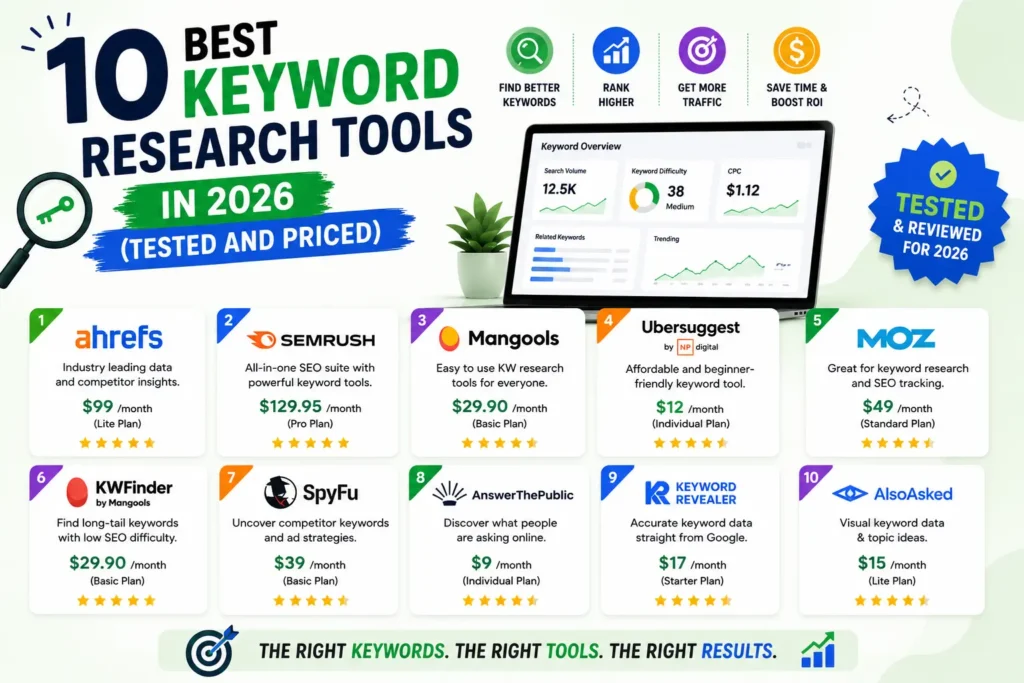
The 10 Best Keyword Research Tools in 2026
| Tool | From | Database | Free tier | Best for |
| Ahrefs | ~$29 Starter, $129 Lite | ~10B | Webmaster Tools (own sites) | Difficulty accuracy |
| Semrush | ~$139.95 | 26.5B+ | 10 searches/day | Largest data, workflows |
| Google Keyword Planner | Free | Google’s own | Yes, unlimited | Volume validation |
| Mangools KWFinder | ~$29.90 | Mid-size | 5 searches/day | Best under $50 |
| Google Search Console | Free | Your own data | Yes, unlimited | Keywords you already rank for |
| SE Ranking | ~$52 to $65 | Mid-large | Trial | AI search visibility |
| Ubersuggest | ~$29 | Mid-size | 3 searches/day | Cheapest paid entry |
| AlsoAsked | Paid tiers | PAA data | Few daily searches | Question clusters |
| AnswerThePublic | Paid tiers | Question data | Few daily searches | Content ideas |
| LowFruits | Credit-based | SERP-derived | Free credits | Low-competition gaps |
1. Ahrefs
Best for difficulty score accuracy.
Pricing: Starter around $29 monthly, Lite around $129. Ahrefs Webmaster Tools is free for domains you own and verify.
What you get: Keywords Explorer with the most trusted difficulty scores in the industry, parent topic identification, SERP overviews with backlink data, Content Explorer, and clickstream-informed volume estimates.
Best for: Anyone whose main risk is targeting keywords they cannot realistically rank for.
Where it falls short: Credit-based limits catch people out on lower tiers, and the Starter plan restricts feature access significantly.
The Starter tier changed this recommendation. At around $29 it puts Ahrefs’ difficulty data within reach of solo operators for the first time.
2. Semrush
Largest database and the deepest workflow.
Pricing: Pro from around $139.95 monthly.
What you get: Keyword Magic Tool, keyword gap analysis, position tracking, content tools, and SERP feature data covering AI Overviews, knowledge panels, and image packs. Semrush One also tracks brand visibility across ChatGPT, Perplexity, and Google AI Overviews.
Best for: Content teams running multi-market or international campaigns, where 142 geographic databases genuinely matter.
Where it falls short: The price. Most users touch a fraction of the platform.
If you use keyword research, competitor analysis, position tracking, and content optimisation together, the bundle earns its cost. If you use one of those, it does not.
3. Google Keyword Planner
The free source that everything else estimates.
Pricing: Free with a Google Ads account, no spend required.
What you get: Search volume ranges, competition levels, top-of-page bid estimates, and keyword ideas from Google’s own data. The current version includes seasonal trend forecasting and local search insights.
Best for: Validating demand before committing to a topic, and settling disputes between other tools.
Where it falls short: Volumes appear as broad ranges without active ad spend, close variants are bundled together, and there is no organic difficulty score. See Google’s own Keyword Planner documentation for what it does and does not measure.
Every serious workflow includes this, whatever else you pay for.
4. Mangools KWFinder
Best tool under $50.
Pricing: Around $29.90 monthly on annual billing, with a free plan allowing five searches daily.
What you get: Clean long-tail workflow, colour-coded difficulty scores, integrated SERP analysis in one view, location-level data, and a Reddit threads finder for real user language.
Best for: Freelancers, bloggers, and small businesses who need accurate data without suite pricing.
Where it falls short: No keyword clustering, no competitive gap analysis, and fewer suggestions in very niche industries.
The clear winner at this price. More accurate difficulty scores than Ubersuggest and a more focused interface than anything comparable.
5. Google Search Console
The most accurate keyword data you will ever see.
Pricing: Free, with no query caps.
What you get: The actual queries bringing people to your site, with impressions, clicks, click-through rate, and average position.
Best for: Improving pages you already rank for, which is the fastest traffic available to any site.
Where it falls short: It only shows keywords you already appear for, so it cannot help you find new territory.
Not a traditional keyword tool, and it belongs on this list because it is the only source reporting your real performance rather than an estimate. Filter to positions 8 to 20 and you have a prioritised list of pages needing small improvements.
6. SE Ranking
Best mid-priced option with AI search coverage.
Pricing: From around $52 to $65 monthly on entry tiers.
What you get: Keyword research rebuilt around AI in 2026, competitor analysis, rank tracking, site audits, white-label reporting, and visibility tracking across AI Overviews, Google AI Mode, ChatGPT, Gemini, and Perplexity.
Best for: Small agencies wanting suite functionality without Semrush pricing.
Where it falls short: Database size does not match Semrush or Ahrefs, and pricing has crept upward.
The AI visibility tracking is currently the broadest in the category. Our detailed SE Ranking versus Ahrefs comparison covers which suits which workflow.
7. Ubersuggest
Cheapest paid entry point.
Pricing: Around $29 monthly, with a lifetime deal option and a free tier limited to three daily searches.
What you get: Keyword ideas, basic site audit, competitor overview, and simple actionable suggestions aimed at beginners.
Best for: People learning SEO who want guidance rather than raw data.
Where it falls short: Volume estimates diverge noticeably from Keyword Planner, and difficulty scores are less reliable than Mangools at the same price.
The lifetime deal is the real argument for it. Paying once beats a subscription you use occasionally.
8. AlsoAsked
Best for question clusters.
Pricing: A few free searches daily, then affordable paid tiers.
What you get: People Also Ask data mapped into a branching tree showing how questions relate to each other.
Best for: Structuring an article around a full question cluster rather than a single query.
Where it falls short: No volume data and no difficulty scores. It answers what to write, not whether anyone searches it.
The tree structure translates directly into your H2 and H3 outline, which is a shortcut most people never find.
9. AnswerThePublic
Best for content ideation.
Pricing: Limited free searches daily, paid from low double figures.
What you get: Questions, comparisons, and prepositions people search around a topic, visualised.
Best for: Generating a month of content angles from one seed keyword.
Where it falls short: The free tier caps quickly, and output needs filtering since not everything it surfaces has real demand.
Pair it with Keyword Planner. This finds the angles, that confirms which ones people actually search.
10. LowFruits
Best for finding winnable keywords.
Pricing: Credit-based rather than subscription, with free credits to start.
What you get: SERP analysis that flags keywords where weak domains currently rank, meaning realistic opportunities for a smaller site.
Best for: New sites and small businesses that keep finding good keywords they cannot compete for.
Where it falls short: Narrow focus and a smaller database than the suites.
The most underused tool on this list. Given that 96.55% of pages get zero traffic, filtering for keywords with weak competition is a more useful lens than raw volume for anyone without domain authority.
Free Keyword Research Tools Worth Using
A complete free workflow exists, and it covers more than people expect.
Google Keyword Planner for volume validation, free with an Ads account and no spend required.
Google Search Console for your existing rankings, free with no caps, and the most accurate data available anywhere.
Google Trends for direction and seasonality, showing whether interest is rising or fading.
Google Autocomplete and related searches, which cost nothing and surface the exact phrasing people use. Type your topic, add each letter of the alphabet, and note the suggestions.
Keyword Surfer, a free Chrome extension showing estimated volumes inside Google results.
Free tiers: Mangools allows five searches daily, Semrush ten, and Ubersuggest three. Enough for spot checks, not enough for a workflow.
The gap in the free stack is competitor research. You can research your own keywords indefinitely for free. Seeing which keywords a competitor ranks for requires paying.
Which Tool Fits Your Budget
- $0: Google Keyword Planner, Search Console, Trends, Autocomplete, and Keyword Surfer. Genuinely sufficient for a new site.
- Under $35: Mangools KWFinder at $29.90, or Ahrefs Starter at around $29 if difficulty accuracy matters more than breadth.
- $50 to $70: SE Ranking, which adds site audits, rank tracking, and AI visibility tracking.
- $130 plus: Ahrefs Lite or Semrush Pro, justified when competitor research and content workflows are daily work rather than occasional.
Where these fit alongside your wider software spend is covered in our comparison of the best digital marketing tools with real pricing.
How to Use Keyword Research Tools Properly
Owning the tool is not the work. This is the sequence that turns data into rankings.
1. Start with Search Console, not a keyword tool. Find where you already rank between positions 8 and 20. Improving an existing page beats creating a new one, and the data is free and accurate.
2. Expand from a seed, then filter for winnability. Generate ideas from your seed keyword, then check who currently ranks. If the first page is dominated by domains far stronger than yours, the volume is irrelevant.
3. Group by intent before writing. Informational, commercial, and transactional queries need different pages. Targeting all three on one page usually ranks for none.
4. Cluster related terms onto one page. Most articles should target one primary keyword and eight to fifteen related variants, not fifteen separate posts. AlsoAsked is useful here for finding the question set.
5. Validate volume in Keyword Planner before committing. A single cross-check prevents building content around a number your tool overestimated.
6. Track what happens. Rankings move slowly. Judge a keyword decision after three months, not three weeks.
Most people stop after step two, which is why so much content targets keywords with real volume and no realistic chance of ranking.
AI Search Has Changed What to Track
One shift worth building into your process.
Keyword tools increasingly cover AI surfaces alongside traditional blue-link results. Semrush One tracks brand visibility across ChatGPT, Perplexity, and Google AI Overviews. SE Ranking covers AI Overviews, Google AI Mode, ChatGPT, Gemini, and Perplexity. Several others are adding similar features.
The practical implication is that question-formatted keywords have become more valuable, since AI systems extract direct answers to direct questions. That raises the usefulness of AlsoAsked and AnswerThePublic considerably relative to three years ago.
Treat the AI visibility data as directional for now. Attribution here is genuinely imprecise, and running your own queries through ChatGPT and Perplexity monthly costs nothing and tells you at least as much.
How We Use Keyword Research Tools at Leemjaz
Patterns from running these across client accounts.
We open Search Console before any paid tool. On almost every new account there are pages sitting in positions 8 to 20 that need a better title and two extra sections, not a new article. That work is free to identify and faster to deliver than anything a keyword tool suggests.
We standardise on one tool per client and never mix volume sources in reporting. We have pulled the same keyword across three platforms and seen materially different numbers. Switching tools mid-campaign and comparing produces conclusions that are not real, and clients notice the inconsistency before you do.
Difficulty scores are a filter, not a verdict. We check the actual first page rather than trusting a number. A keyword scored as difficult but ranking three thin forum posts is winnable. One scored as easy with five established brands on page one is not.
We plan around clusters, not single keywords. One page targeting a primary term plus a dozen related questions outperforms a dozen thin pages, and it matches how search engines evaluate topical coverage. This is how our SEO work is structured on every account.
Most clients need a $30 tool, not a $140 one. When we audit what someone actually uses, it is keyword ideas, difficulty checks, and occasional rank tracking. Mangools covers that. The upgrade becomes worthwhile when competitor gap analysis becomes weekly work, and not before.
Keyword Research Tools FAQs
What are the best keyword research tools in 2026?
Ahrefs for the most accurate difficulty scores, Semrush for the largest database and broadest workflows, and Mangools KWFinder at around $29.90 for the best value under $50. Google Keyword Planner and Search Console are free and belong in every workflow regardless of what else you use.
What is the best free keyword research tool?
Google Keyword Planner, since it is the only tool pulling volume data directly from Google, free with an Ads account and no spend required. Pair it with Google Search Console for the keywords you already rank for, Google Trends for direction, and Keyword Surfer for quick in-SERP checks.
Why do keyword tools show different search volumes?
Because each estimates differently. Keyword Planner reports Google’s own data in ranges and bundles close variants together, while Ahrefs and Semrush build estimates from clickstream data and modelling using different sources. Pick one tool as your reference and cross-check important numbers in Keyword Planner.
Is Ahrefs or Semrush better for keyword research?
Ahrefs has more accurate difficulty scores and a larger backlink index, which matters most when you need to judge whether a keyword is winnable. Semrush has a bigger keyword database at over 26.5 billion terms, 142 geographic databases, and stronger competitive and content workflows. Your priority decides it.
Do I need a paid keyword research tool?
Not at first. Google Keyword Planner, Search Console, Trends, and Autocomplete cover keyword discovery and validation completely at no cost. Paying becomes worthwhile when you need competitor keyword data and reliable difficulty scores, since neither is available free at useful volume.
How accurate is keyword search volume data?
Directionally accurate, not precisely. All third-party figures are estimates, and even Google’s own data appears as ranges without active ad spend. Treat the difference between 500 and 700 searches as noise, and the difference between 50 and 5,000 as meaningful. Search Console is the only exact data you get, and only for keywords you already rank for.
Conclusion
The best keyword research tools are the ones matching the decision you actually need to make: whether demand exists, whether you can win the keyword, or what to write about next. Different tools answer different questions, and buying the most expensive one does not answer all three. Start with Google’s free tools and Search Console, add Mangools or Ahrefs Starter when you need difficulty scores you can trust, and only move to a full suite when competitor research becomes weekly work. Given that most keywords get fewer than ten monthly searches and most pages get no traffic at all, choosing winnable targets matters far more than which dashboard you look at.