Most lists of AI marketing tools for small business are written for companies with a marketing department. They recommend $49 monthly copywriters to businesses already paying $20 for a general AI assistant that does the same job, and they skip the AI features sitting unused inside software you already subscribe to.
This list works differently. Ten tools, every one free or under $20 monthly, chosen because they do something a general AI assistant cannot. There is also a section on what not to buy, which will probably save you more than the list itself.
What AI Actually Does Well for a Small Business
Be clear about the job before buying anything. AI is genuinely good at four things at this scale.
Removing blank pages. First drafts, outlines, subject lines, ad variations. Not final copy, but a starting point instead of nothing.
Repurposing. Turning one long asset into ten short ones. A webinar becomes clips, a blog post becomes a carousel, a sales call becomes an FAQ page. This is where AI produces the most value for the least risk.
Speed on repetitive tasks. Resizing, captioning, transcribing, tagging, formatting. Work that took hours and now takes minutes.
Research and summarising. Digesting reports, competitor pages, or customer feedback into something usable.
What it does not do: understand your customers, know your market, or produce publishable content without editing. Every wasted AI subscription I have seen came from expecting one of those three.
The 10 Best AI Marketing Tools for Small Business
1. ChatGPT
What it does: Drafting, outlining, brainstorming, summarising, data analysis, image generation, and web search.
Cost: Free tier is genuinely usable. Plus is around $20 monthly.
Best for: Your one general-purpose assistant. Everything else on this list should do something this cannot.
Watch out: It fabricates statistics and search volumes with complete confidence. Use it for structure and ideas, and verify every number elsewhere.
2. Claude
What it does: Long-form writing, editing, document analysis, and working through complex briefs.
Cost: Free tier available, paid around $20 monthly.
Best for: Longer content and editing work, where output quality over 1,000 words matters.
Watch out: Running both this and ChatGPT at $20 each is $480 yearly for overlapping capability. Pick one unless you have a specific reason for both.
3. Perplexity
What it does: Answers research questions with cited sources, showing exactly which pages it drew from.
Cost: Free tier is sufficient for most small businesses. Pro around $20 monthly.
Best for: Research you need to verify, and checking whether your business appears in AI-generated answers.
Watch out: Most people miss the second use entirely, which is a mistake. Run your main commercial queries through it monthly and note whether you are cited. As buyers increasingly ask AI assistants for recommendations instead of searching, this free check tells you something no analytics dashboard currently can.
4. Canva Magic Studio
What it does: AI background removal, one-click resizing across formats, text-to-image, magic write, and brand-consistent template generation.
Cost: Free tier includes several AI features. Pro around $15 monthly.
Best for: Every small business without a designer.
Watch out: People pay for standalone AI image tools without realising Canva includes generation, editing, and resizing in one subscription they already have.
5. CapCut
What it does: Auto-captions, auto-cut of silences, background removal, and AI-matched trending audio for vertical video.
Cost: Free, with a Pro tier around $8 monthly.
Best for: Producing Reels, TikToks, and Shorts without an editor.
Watch out: Some effects and templates are Pro-only, and certain exports carry watermarks. The auto-caption feature alone justifies installing it, since most social video is watched on mute.
6. Opus Clip
What it does: Takes one long video and automatically cuts it into short vertical clips, choosing the moments most likely to perform and adding captions.
Cost: Free tier with monthly processing minutes, paid from around $9 to $15 monthly.
Best for: Businesses producing webinars, podcasts, interviews, or long YouTube content.
Watch out: Its choice of highlight is not always right, so review before posting. Even so, this is the highest leverage tool on the list for anyone already making long video, because it turns one recording into a month of social content.
7. Descript
What it does: Edits video and audio by editing the transcript, removes filler words automatically, generates captions, and extracts clips.
Cost: From around $19 monthly, with a limited free tier.
Best for: Turning podcasts, webinars, and recorded calls into publishable content.
Watch out: Transcription minutes are capped by tier. If your content is mostly written rather than spoken, skip this one.
8. Metricool
What it does: Social scheduling with AI caption and hashtag generation, best-time-to-post prediction, and competitor tracking.
Cost: Free tier available, paid from around $18 monthly billed annually for up to five brands.
Best for: Small businesses that want scheduling and AI assistance in one place rather than two subscriptions.
Watch out: The free plan excludes LinkedIn and X, which rules it out for B2B unless you upgrade. Which scheduler suits you depends heavily on billing structure, and the differences between social media marketing tools and their pricing models matter more than the AI features on top.
9. Brevo
What it does: Email marketing with AI subject line generation, send-time optimisation, and content suggestions.
Cost: Free plan sends around 300 emails daily with unlimited contacts. Paid from around $9 monthly.
Best for: Small businesses running email who want AI assistance included rather than bolted on.
Watch out: AI features vary by tier. The reason to choose Brevo is volume-based pricing with unlimited contacts, and the AI is a bonus rather than the reason.
10. Make
What it does: Connects your tools so work moves automatically, with AI modules that can process, classify, or generate content inside a workflow.
Cost: Free tier covers 1,000 operations monthly. Paid from around $9.
Best for: Eliminating the copy-paste work between tools, such as new form submission to CRM to personalised follow-up email.
Watch out: There is a learning curve, and it is easy to over-automate things that would be faster done manually. Start with one workflow that genuinely wastes your time weekly.
The AI You Are Already Paying For
Before buying anything above, check what your existing subscriptions include. Small businesses routinely pay twice.
- Canva includes text generation, image generation, background removal, and resizing.
- Buffer, Metricool, Publer, and Hootsuite all include AI caption assistance.
- Brevo, MailerLite, and Mailchimp include AI subject lines and send-time optimisation.
- Google Ads includes automated asset generation and Smart Bidding.
- Microsoft Clarity includes AI-generated summaries of session recordings, free with no paid tier at all.
- Google Workspace and Microsoft 365 both bundle AI assistants on many plans.
Audit these first. On more than one occasion I have seen a business cancel two AI subscriptions after discovering the same features in software they were already paying for.
AI Marketing Tools for Small Business You Should Not Buy
Four categories that waste small budgets.
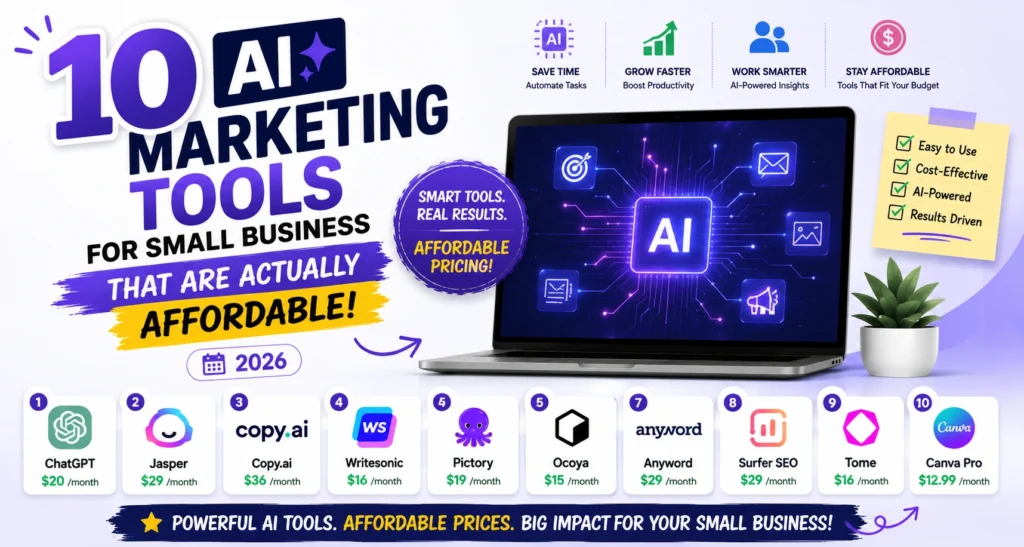
Standalone AI copywriters. Jasper, Copy.ai, and similar tools start around $39 to $49 monthly. If you already pay $20 for ChatGPT or Claude, you are buying the same capability twice with a marketing-flavoured interface on top.
Enterprise AI platforms. HubSpot’s AI features, Klaviyo’s predictive analytics, and Salesforce Einstein are excellent and priced for companies with a marketing team. At small business scale you pay for governance and scale you will not use.
Anything described as an all-in-one AI marketing platform. These typically do one job well and five adequately, and you end up supplementing the five anyway.
Tools that are visibly ChatGPT wrappers. If a product’s entire function is prompting a model you already have access to, you are paying a markup for prompt templates. Test whether ChatGPT can do the same job before subscribing.
What an AI Marketing Stack Actually Costs
Three realistic setups.
Free stack, $0 monthly. ChatGPT free, Canva free, CapCut free, Opus Clip free tier, Brevo free, Microsoft Clarity, Perplexity free. This is a complete working AI marketing setup at zero cost, and most small businesses should run it for a month before spending anything.
Standard stack, roughly $35 to $55 monthly. One AI assistant at $20, Canva Pro at $15, and either a scheduler or a repurposing tool. This is where most small businesses should land.
Content-heavy stack, roughly $60 to $80 monthly. Add Descript for video and audio, plus Make for automation. Only worth it if you produce recorded content weekly.
If your AI spend passes $100 monthly as a small business, check for duplication before assuming you need more. How AI tools fit alongside the rest of your software, and what each category costs, is covered in our comparison of the best digital marketing tools with real pricing.
The AI Content Risk Worth Understanding
One caution that belongs in any honest guide on this subject.
Google’s spam policies explicitly address scaled content abuse, meaning content produced at volume primarily to manipulate rankings rather than help readers. The method does not matter. AI-assisted content that is edited, fact-checked, and genuinely useful is fine. Unedited AI output published at volume is exactly what the policy targets, and you can read the current position in Google’s spam policies documentation.
The practical line for a small business: use AI for the first draft and the structure, then add what only you know. Your pricing, your customers’ actual objections, the mistake you made last year, the specific thing that goes wrong in your industry. That is the part no model can generate, and it is also the part readers and search engines both reward.
How We Use AI Marketing Tools With Clients at Leemjaz
What we have learned running these across client accounts.
We audit existing subscriptions before recommending anything new. The first thing we do is list what a client already pays for and what AI those tools include. It regularly turns up two or three duplicate capabilities, and the cancellation saves more than our first month of work costs.
Repurposing produces more value than generation. The clients who get the most from AI are the ones turning existing assets into more assets. One recorded consultation becomes a blog post, five social clips, three email topics, and an FAQ section. Generating brand new content from scratch is where output quality drops and where readers notice.
We never publish AI drafts without a subject matter pass. Every piece goes back to someone who actually knows the business, because the specific details are what make content worth reading. AI gets us to a structured draft faster. It does not get us to publishable.
Automation before generation. We usually set up one Make workflow before touching content AI, because removing a repetitive weekly task frees more hours than faster drafting does. Form submission to CRM to follow-up email is the one we build most often.
Measure it or you are guessing. We tag AI-assisted campaigns the same way as everything else and compare performance against the previous approach. On a few accounts AI-drafted email subject lines underperformed the human versions, and we went back. Running the numbers costs nothing, and a set of free marketing calculators is enough to work out whether a subscription is returning more than it costs.
AI Marketing Tools for Small Business FAQs
What are the best AI marketing tools for small business?
ChatGPT or Claude as your general assistant at around $20, Canva Magic Studio for design at $15, and CapCut free for video cover most needs. Add Opus Clip if you produce long video, Brevo for AI-assisted email, and Perplexity free for research. Most small businesses need three tools, not ten.
How much should a small business spend on AI marketing tools?
Nothing for the first month, since free tiers of ChatGPT, Canva, CapCut, Brevo, and Perplexity form a complete working setup. After that, $35 to $55 monthly covers a standard stack. Above $100 monthly at small business scale, you are almost certainly paying twice for the same capability.
Can AI replace a marketing agency or marketer?
No, and the tools do not claim to. AI produces drafts, clips, and variations quickly, but it does not know your customers, choose your strategy, or judge whether output is any good. It reduces execution time, which means a small team gets more done, not that you need no one.
Do I need a paid AI writing tool like Jasper?
Almost certainly not. Tools like Jasper and Copy.ai start around $39 to $49 monthly and largely wrap models you can access for $20 through ChatGPT or Claude. If you already pay for a general assistant, a separate AI copywriter duplicates capability you have.
Will Google penalise AI-generated content?
Google penalises unhelpful content produced at scale to manipulate rankings, not AI use itself. Its spam policies target scaled content abuse regardless of how the content was made. AI-assisted content that is edited, fact-checked, and adds genuine expertise is fine, which is why the human editing pass matters more than the drafting tool.
What free AI marketing tools are actually worth using?
ChatGPT and Claude free tiers cover drafting and research, Canva free includes several AI design features, CapCut is free for video with auto-captions, and Perplexity free handles cited research. Microsoft Clarity is free permanently with AI session summaries. Together these run a complete marketing operation at zero software cost.
Conclusion
The businesses getting real value from AI marketing tools for small business are not the ones with the most subscriptions. They are the ones using two or three consistently on the tasks that genuinely waste their week. Audit what you already pay for, run the free tiers for a month, and buy only the tool that solves a problem the free stack cannot. That order costs nothing and prevents the far more expensive mistake of paying for capability you already own.