Most guides to marketing automation tools for small business list a dozen platforms and never mention the thing that actually determines whether automation works: which workflows you build and in what order. Businesses buy the software, build one welcome email, and let the subscription run for a year doing nothing else.
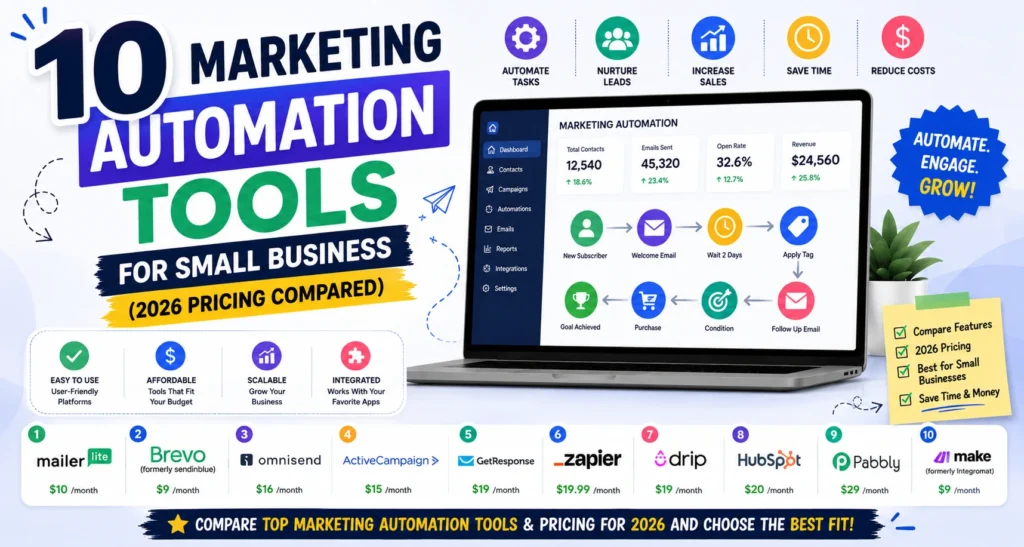
This guide covers ten affordable platforms with verified 2026 pricing, splits them into the two categories people confuse constantly, and ends with the five workflows worth building first. I have kept every option genuinely affordable, which means no Marketo, no Pardot, and no HubSpot Marketing Hub, all built for companies with a marketing department.
What Marketing Automation Actually Means for a Small Business
Two different product categories share this label, and picking the wrong one wastes money.
Marketing automation platforms run customer-facing sequences. Welcome emails, abandoned cart reminders, lead nurture, re-engagement campaigns, birthday offers. They own your contact list and send on triggers. Brevo, ActiveCampaign, and EngageBay live here.
Workflow automation tools connect the apps you already use so data moves without you. Form submission goes to your CRM, then triggers a Slack notification, then adds a task. Make, Zapier, and n8n live here.
Which you need first. If your problem is “I never follow up with leads consistently,” you need a marketing automation platform. If your problem is “I spend two hours weekly copying data between tools,” you need workflow automation. Many small businesses need both eventually, and almost nobody needs both in month one.
The 10 Best Marketing Automation Tools for Small Business
1. Brevo
What it automates: Email sequences, SMS and WhatsApp campaigns, transactional email, basic CRM workflows, and live chat.
Free plan: 300 emails daily with unlimited contacts, plus automation for a capped contact count.
Paid from: Around $9 monthly for Starter, $18 for Business.
Best for: Small businesses with large contact lists who send infrequently.
Watch out: The automation builder is functional rather than sophisticated, the CRM is basic, and landing page templates are limited.
Volume-based pricing makes this dramatically cheaper than contact-based competitors once your list passes about 10,000. If your list is big and your sending is occasional, nothing here beats it on cost.
2. EngageBay
What it automates: Email sequences, lead scoring, deal pipeline movement, helpdesk ticketing, and live chat, all in one subscription.
Free plan: Around 500 contacts with core features.
Paid from: Around $11.99 monthly for 1,000 contacts and 3,000 emails. Marketing Pro around $49.99 for 3,000 contacts.
Best for: Small businesses that would otherwise pay for HubSpot at three to five times the price.
Watch out: The bundling is genuine, but every individual module sits a step below the category specialist. You are trading depth for consolidation.
The best value all-in-one on this list. If you are currently stitching together an email tool, a CRM, and a helpdesk, this replaces all three.
3. ActiveCampaign
What it automates: Multi-step conditional workflows with 135 plus triggers, lead scoring, site tracking, CRM automation, and split testing of entire automation paths.
Free plan: None. 14-day trial without a credit card.
Paid from: Lite around $15 to $19 monthly, Plus $49, Professional $79.
Best for: Businesses where automation depth is the actual requirement rather than a nice-to-have.
Watch out: Steeper learning curve than anything else here, and pricing scales meaningfully with contact count.
If your workflows involve genuine if-then branching rather than a linear sequence, this is the one that handles it. If they do not, you are paying for capability you will not use.
4. GetResponse
What it automates: Email sequences, sales funnels, abandoned cart flows, webinar follow-ups, and course delivery.
Free plan: Up to 500 contacts.
Paid from: Around $15 to $19 monthly.
Best for: Small businesses that need automation plus landing pages plus webinars in one place.
Watch out: Funnel and webinar features push you into higher tiers, so price the exact plan you need rather than the advertised entry point.
The strongest all-in-one for businesses selling services or digital products, and comparable automation to ActiveCampaign at a lower entry price.
5. MailerLite
What it automates: Welcome sequences, tag-based triggers, abandoned cart for connected stores, and simple conditional splits.
Free plan: Several hundred subscribers with automation included, which most competitors paywall.
Paid from: Around $10 to $12 monthly for 1,000 subscribers with unlimited sending.
Best for: Businesses that want light automation without a learning curve.
Watch out: Deliberately simple. Multi-branch logic and lead scoring are not here.
The right choice for a business whose automation needs are a welcome series and a re-engagement campaign, which describes most small businesses honestly.
6. Omnisend
What it automates: Abandoned cart, browse abandonment, post-purchase sequences, win-back flows, and cross-channel email plus SMS plus push.
Free plan: 250 contacts and 500 emails monthly with all features unlocked.
Paid from: Around $16 monthly for Standard, $59 for Pro.
Best for: Small ecommerce stores on Shopify or WooCommerce.
Watch out: Genuinely ecommerce-only. Without store data the pre-built flows have nothing to trigger on, and SMS credits cost extra.
Pre-built ecommerce automations at a fraction of Klaviyo’s cost. For a small store this is the pick.
7. Zoho Marketing Automation
What it automates: Lead nurture, behavioural triggers, journey builder, and lead scoring, with native handoff into Zoho CRM.
Free plan: Limited tier available.
Paid from: Genuinely low entry pricing, with roughly $54 monthly at 10,000 contacts compared with $135 for equivalent Mailchimp tiers.
Best for: Businesses already inside the Zoho ecosystem, or willing to adopt it.
Watch out: Email design quality and template range sit below MailerLite and Brevo, and value drops sharply if you use nothing else from Zoho.
Unlimited sending protects you from overage charges, which matters if your send frequency is unpredictable.
8. HubSpot Free CRM
What it automates: Contact management, deal stages, email tracking and notifications, form handling, and simple task automation.
Free plan: Free for unlimited users, permanently.
Paid from: Marketing Hub tiers, which are priced well beyond this list.
Best for: Small businesses currently tracking leads in a spreadsheet.
Watch out: Be very clear that the free CRM and the paid Marketing Hub are different products. The free tier is genuinely good. The upgrade path is expensive, and the upsell pressure is constant.
Worth including because it is free forever and solves the contact management problem before you commit to any paid platform.
9. Make
What it automates: Connections between your apps, with visual multi-step workflows, conditional routing, data transformation, and AI modules inside a flow.
Free plan: 1,000 operations monthly.
Paid from: Around $9 monthly.
Best for: Eliminating manual copy-paste between tools.
Watch out: A real learning curve, and it is easy to over-engineer workflows that would be faster done by hand. If you want the same capability free and can self-host, n8n is the open-source equivalent.
Cheaper and more flexible than Zapier once you learn it, and the visual builder makes complex logic easier to follow.
10. Zapier
What it automates: The same job as Make, with the widest app library in the category and a much gentler learning curve.
Free plan: 100 tasks monthly with single-step automations.
Paid from: Around $20 monthly for multi-step workflows.
Best for: Non-technical business owners who need something working today.
Watch out: Task-based pricing gets expensive at volume, and the free tier’s single-step limit rules out most useful workflows.
Pay the premium over Make if setup time matters more to you than monthly cost, which for a busy owner it often does.
Contact-Based vs Volume-Based Pricing
This decides your bill more than any feature comparison.
Contact-based platforms charge for every subscriber stored, whether you email them or not. ActiveCampaign, Mailchimp, EngageBay, and most of this list work this way. Costs climb as your list grows even if sending stays flat.
Volume-based platforms charge for emails sent with unlimited contacts. Brevo is the main example, and Zoho’s unlimited sending model behaves similarly in reverse.
Run this quick check before choosing. Multiply your list size by your monthly send frequency. A business with 20,000 contacts emailing once monthly sends 20,000 emails. On contact-based pricing you pay for 20,000 contacts. On volume-based you pay for 20,000 sends. Those tiers are priced very differently, and the gap widens as the list grows.
What Marketing Automation Costs at Small Business Scale
Approximate monthly ranges, verified against current vendor pricing.
| Contacts | Entry option | Typical spend | What changes |
| Under 500 | Free (Brevo, EngageBay, MailerLite, GetResponse) | $0 | No small business needs to pay here |
| 500 to 2,500 | MailerLite $10, Brevo $9, EngageBay $12 | $10 to $25 | First real decision point |
| 2,500 to 10,000 | Brevo $18, ActiveCampaign $19 to $49 | $20 to $80 | Automation depth starts justifying cost |
| Over 10,000 | Zoho around $54, Brevo volume tiers | $60 to $200 | The biggest jump in the whole journey |
For businesses under 25 employees and 5,000 contacts, $20 to $100 monthly is the realistic band. The sharpest increase comes at 10,000 contacts, where contact-based platforms move into $100 to $300 territory. How automation fits alongside your wider software spend is covered in our comparison of the best digital marketing tools with real pricing.
The Five Workflows to Build First
Buying the platform is not the work. These five cover the majority of the value, and most small businesses have never built more than one.
1. Welcome sequence. Three to five emails triggered by a new signup, delivering whatever you promised plus context on who you are. This is the highest-engagement email you will ever send, because interest is at its peak.
2. Lead follow-up. Enquiry form submission triggers an immediate acknowledgement, then a follow-up 48 hours later if nobody has replied. Speed of response is the single biggest determinant of whether an enquiry converts, and manual follow-up is exactly what gets forgotten on a busy week.
3. Abandoned cart or abandoned enquiry. For ecommerce, the standard cart recovery flow. For service businesses, the equivalent is someone who started a booking or quote form and did not finish.
4. Re-engagement. Anyone who has not opened in 90 days gets a short sequence, then gets removed. This protects deliverability and cuts your bill on contact-based plans, since you stop paying to store people who will never buy.
5. Post-purchase or post-service. A thank you, then a review request timed for when they have actually experienced the thing. Review volume affects local search visibility, which makes this the workflow with the widest knock-on effect.
Build these in order. If you get through all five and they are running properly, you have already extracted more value than most businesses ever do from a marketing automation subscription.
Deliverability Rules Automated Email Must Meet
Worth knowing before you set sequences running, because automation increases volume and volume attracts scrutiny.
Since February 2024, Google requires all senders to configure SPF or DKIM authentication, use a TLS connection, and keep spam complaint rates below 0.3 percent. Senders exceeding 5,000 messages daily to Gmail must have both SPF and DKIM, publish a DMARC record, and support one-click unsubscribe processed within two days. Gmail began issuing permanent rejections for non-compliant senders in late 2025. The current requirements are on Google’s email sender guidelines.
Every platform on this list supplies the DNS records. You still have to add them, and it takes about ten minutes. Automated sequences sending from an unauthenticated domain is the most common reason small business automation quietly stops working.
Which Marketing Automation Tools for Small Business Should You Choose?
By business type, since that decides more than feature lists do.
- Local service business: Brevo free, then Starter. Unlimited contacts and generous free sending mean you may never pay.
- Small ecommerce store: Omnisend, for the pre-built purchase flows.
- Consultant, coach, or course seller: GetResponse, for automation plus landing pages plus webinars in one subscription.
- B2B with a sales pipeline: EngageBay for the all-in-one, or ActiveCampaign if automation depth matters more than budget.
- Already using Zoho: Zoho Marketing Automation, for the CRM handoff.
- Simple needs, no appetite for complexity: MailerLite.
- Your problem is apps not talking to each other: Make or Zapier, and possibly no marketing automation platform at all yet.
If you are building a software stack from scratch rather than solving one problem, our breakdown of the best SaaS tools for startups with pricing covers how these fit alongside CRM, analytics, and the rest.
How We Set Up Marketing Automation Tools for Small Business Clients at Leemjaz
Patterns from doing this repeatedly.
Nearly every business we audit has an automation platform and one active workflow. A welcome email, built during onboarding, running for two years. Everything else in the subscription sits unused. Before recommending a new platform we check what the current one can already do, and the answer is usually more than the client realised.
We build lead follow-up before anything else. Not the welcome sequence, which is what most guides suggest. Enquiry follow-up is where revenue leaks fastest in a small business, because manual follow-up is the first thing dropped during a busy week. It is also the fastest workflow to prove value on.
We set up domain authentication before the first sequence sends. SPF, DKIM, and DMARC records go in on day one. Businesses that skip this see automated emails land in spam, then conclude automation does not work for them.
We tag every automated link with UTM parameters. Without them GA4 attributes automation-driven traffic to direct, and you lose the ability to prove the subscription is paying for itself. A free UTM link builder keeps naming consistent so reporting stays clean as workflows multiply.
We cap the number of active workflows early on. Five well-maintained sequences beat fifteen that nobody has reviewed since launch. Automation that sends the wrong message to the wrong segment does more damage than no automation, and we have inherited accounts sending welcome emails to customers who bought two years ago.
Marketing Automation Tools for Small Business FAQs
What is marketing automation for a small business?
Marketing automation is software that runs repetitive marketing tasks on triggers rather than manually. Welcome emails, lead follow-up, abandoned cart reminders, and re-engagement campaigns all send themselves once configured. For a small business it mainly solves consistency, since automated follow-up happens even during your busiest week.
How much do marketing automation tools cost for a small business?
Nothing under 500 contacts, since Brevo, EngageBay, MailerLite, and GetResponse all have free tiers. Between 500 and 10,000 contacts expect $10 to $80 monthly depending on platform and send frequency. Above 10,000 contacts costs jump to $60 to $200, which is the steepest increase in the whole journey.
What is the best marketing automation tool for a small business?
Brevo for most, because of volume-based pricing and unlimited contacts. EngageBay if you want marketing, CRM, and helpdesk in one subscription at around $12. ActiveCampaign if genuine multi-branch automation is the requirement and you accept the steeper price and learning curve.
Is marketing automation worth it for a small business?
Yes, if you actually build the workflows. The businesses that see returns build five sequences and maintain them. The ones that do not build a welcome email and let the subscription run unused for a year. The software is cheap; the setup effort is what determines whether it pays back.
What is the difference between marketing automation and email marketing?
Email marketing sends campaigns you write and schedule to a list. Marketing automation sends messages triggered by behaviour, such as someone signing up, abandoning a cart, or going quiet for 90 days. Most platforms now include both, so the distinction matters less than whether the automation builder handles the logic you need.
Do I need Zapier or Make if I already have a marketing automation platform?
Only if your problem is apps not talking to each other. Marketing automation platforms handle customer-facing sequences within their own system. Zapier and Make move data between separate tools, such as pushing form submissions into your CRM and notifying Slack. Different jobs, and many small businesses need only one.
Conclusion
Choosing between marketing automation tools for small business is genuinely less important than what you do after choosing. Every platform on this list can run the five workflows above, and most businesses never build past the first one. Start on a free tier, build lead follow-up in week one, and add a workflow monthly until all five are running. That sequence costs almost nothing and produces more return than upgrading to a more capable platform you will use exactly as lightly as the last one.