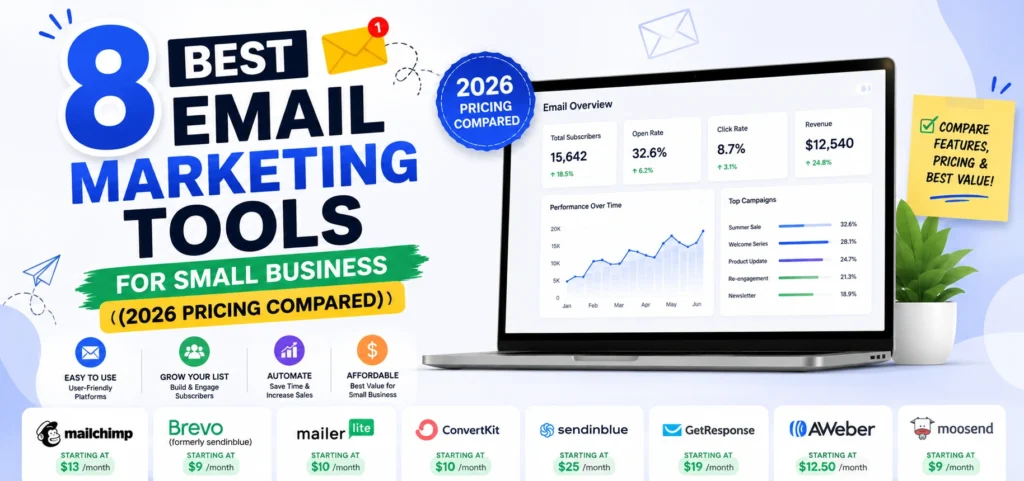
Picking between the best email marketing tools for small business usually comes down to one thing nobody explains properly: whether the platform charges you for contacts stored or emails sent. Get that wrong and you pay four times more than you need to for identical features.
This guide covers eight affordable platforms with verified 2026 pricing, the free plans that are still worth using after a rough two years of cuts, and what each one actually costs as your list grows. I have kept every option on this list genuinely affordable, so no Klaviyo, no HubSpot Marketing Hub, and no ActiveCampaign, all of which are good products priced for companies larger than yours.
The Pricing Model That Decides Your Bill
Two structures dominate, and the gap between them is enormous.
Contact-based pricing. You pay for every subscriber stored, whether you email them or not. Mailchimp, Kit, and most creator platforms work this way. Costs rise as your list grows even if your sending stays flat.
Volume-based pricing. You pay for emails sent, with contacts unlimited. Brevo is the main example. Costs rise with how often you send, not how many people you have.
Which one suits you:
- Large list, infrequent sending (5,000 subscribers, one email monthly): volume-based wins by a wide margin.
- Small list, frequent sending (500 subscribers, three emails weekly): contact-based is usually cheaper.
- Growing list, steady sending: run the maths at your projected twelve-month list size, not today’s.
A business with 50,000 contacts sending one campaign monthly pays for 50,000 emails on Brevo and 50,000 contacts on Mailchimp. Those are very different invoices for the same campaign.
The 8 Best Email Marketing Tools for Small Business
1. Brevo
What it does: Email campaigns, automation, signup forms, landing pages on higher tiers, plus SMS and WhatsApp.
Free plan: 300 emails daily, roughly 9,000 monthly, with unlimited contacts and automation for up to 2,000 contacts.
Paid from: Around $9 monthly for 5,000 emails.
Best for: Small businesses with a growing list who send regularly, and anyone with a big list they email occasionally.
Watch out: Removing Brevo branding requires a paid add-on, and the daily send cap matters more than the monthly total since you cannot send one large campaign in a single day on the free plan.
Brevo is the most generous free plan available for volume, and the only major platform that stores unlimited contacts at every tier. If you are unsure where to start, start here.
2. MailerLite
What it does: Email campaigns, automation, A/B testing, landing pages, and a website builder.
Free plan: 500 to 1,000 subscribers depending on current terms, with 12,000 emails monthly, automation and landing pages included.
Paid from: Around $10 to $12 monthly for 1,000 subscribers with unlimited sending.
Best for: Small businesses that want the cleanest interface and the best value paid plan.
Watch out: It halved its free subscriber limit from 1,000 to 500 in September 2025, so confirm the current figure before building a list around it. Free plan emails carry MailerLite branding and exclude templates.
Automation and landing pages on a free tier is rare, and the paid entry price is the best value in this list for a business under 1,000 subscribers.
3. Kit (formerly ConvertKit)
What it does: Broadcasts, sequences, tag-based segmentation, signup forms, and a creator recommendation network.
Free plan: Up to 10,000 subscribers with unlimited emails, no time limit.
Paid from: Around $39 monthly at 1,000 subscribers.
Best for: Creators, bloggers, coaches, and anyone selling digital products to an audience.
Watch out: The free plan is generous on list size and thin on features, with one automation, no integrations, and Kit branding on every email. Kit also raised prices substantially in September 2025, so the jump from free to paid is steep.
No other platform lets you reach 10,000 subscribers without paying. If your model is publish, build trust, sell, this is the right tool.
4. Sender
What it does: Email and SMS campaigns, automation, popups, and segmentation.
Free plan: One of the most generous available, typically covering a few thousand subscribers and a high monthly send allowance with automation included.
Paid from: Around $8 to $15 monthly depending on list size.
Best for: Small businesses that want real automation on a free plan without the feature restrictions Kit imposes.
Watch out: Smaller company with fewer integrations than the major platforms, and free plan emails carry branding.
Consistently rated among the most generous free tiers in the category, and it is the option most often missed because the brand is less known.
5. GetResponse
What it does: Email, automation, landing pages, sales funnels, webinars, and a course builder in one platform.
Free plan: Up to 500 contacts with unlimited sending.
Paid from: Around $15 to $19 monthly.
Best for: Small businesses that would otherwise pay separately for email, landing pages, and webinar software.
Watch out: Webinar and funnel features push you into higher tiers, so price the exact plan you need rather than the advertised entry price.
The strongest all-in-one at this price point. If you are currently paying for three tools, this often replaces all of them for less.
6. Omnisend
What it does: Email, SMS, and push in one builder, with pre-built ecommerce automations and deep Shopify and WooCommerce integration.
Free plan: 250 contacts and 500 emails monthly, but with all features unlocked.
Paid from: Around $16 monthly for Standard, $59 for Pro.
Best for: Online stores specifically.
Watch out: Genuinely ecommerce-only. Product pickers, discount blocks, and purchase-based segmentation are useless without a store, and SMS credits cost extra.
For a small store that wants Klaviyo-style abandoned cart and post-purchase flows without Klaviyo pricing, this is the pick.
7. Zoho Campaigns
What it does: Email campaigns, automation, and reporting with native integration into Zoho CRM.
Free plan: A modest contact and monthly send allowance, enough to test properly.
Paid from: Among the cheapest paid tiers in the category, typically under $10 monthly at small list sizes.
Best for: Businesses already using Zoho CRM or other Zoho products.
Watch out: Standalone value is thinner if Zoho is not already in your stack, and the interface feels dated next to MailerLite.
The cheapest credible option with a real CRM behind it, which matters if you sell to leads rather than broadcast to subscribers.
8. AWeber
What it does: Email campaigns, automation, landing pages, and web push notifications.
Free plan: Up to 500 subscribers with a monthly send allowance, and phone support included even on free.
Paid from: Around $15 monthly.
Best for: Non-technical business owners who want to speak to a person when something breaks.
Watch out: Interface and templates feel older than newer competitors, and the free send allowance is tighter than Brevo or MailerLite.
Phone support on a free plan exists nowhere else in this category. For a business owner doing this alone, that is worth more than a slicker builder.
What About Mailchimp?
It is the most recognised name in email marketing and, for most small businesses starting now, no longer the right choice.
The free plan was cut to 250 contacts and 500 emails monthly, and automation was removed entirely, which turns it into a demo rather than a working tier. Paid plans price by contact count, so costs climb as your list grows even if your sending does not. What Mailchimp still has is the widest integration ecosystem, with 300 plus connections, and genuinely good templates.
Stay with Mailchimp if you already depend on an integration nothing else supports. Choose something else if you are starting fresh, because Brevo, MailerLite, and Sender all give you more at every price point.
What the Best Email Marketing Tools for Small Business Cost as Your List Grows
Approximate monthly costs at three list milestones, assuming regular sending.
| Subscribers | Cheapest good option | Typical mid-range | Notes |
| 0 to 500 | Free (Brevo, MailerLite, Sender, GetResponse, AWeber) | $0 | No small business needs to pay at this size |
| 500 to 1,000 | MailerLite around $10 to $12 | Brevo from $9, GetResponse from $15 | The first real decision point |
| 1,000 to 5,000 | Brevo or MailerLite, roughly $20 to $40 | GetResponse $19 to $50 | Depends heavily on send frequency |
| 5,000 to 10,000 | Kit free if features allow, otherwise $40 to $70 | Volume pricing pulls ahead here | Contact-based tools get expensive fast |
If you are a small business paying more than about $50 monthly for email at under 5,000 subscribers, you are on the wrong pricing model rather than the wrong tool.
Deliverability Rules Your Email Tool Must Support in 2026
This is where small businesses get quietly hurt, and no other guide on this topic covers it.
Since February 2024, Google requires all senders to have SPF or DKIM authentication configured, use a TLS connection, and keep spam complaint rates below 0.3 percent as reported in Postmaster Tools. Senders exceeding 5,000 messages daily to Gmail addresses must have both SPF and DKIM, publish a DMARC record at minimum p=none, and support one-click unsubscribe processed within two days. Gmail began issuing permanent rejections for non-compliant senders in November 2025, so this is enforced rather than advisory. The full requirements are on Google’s email sender guidelines.
What this means when choosing a tool. Every platform on this list handles the technical side, but you still have to configure it. Before committing, confirm three things:
- The platform lets you authenticate your own domain. Sending from a free Gmail address rather than your business domain damages deliverability regardless of which tool you use.
- It provides SPF and DKIM records to add to your DNS. All eight do. The setup takes about ten minutes and is the single highest-impact thing you will do for open rates.
- One-click unsubscribe is built in, which it is on every major platform, and it is worth checking on smaller providers.
The practical takeaway for a small business: your spam rate matters more than your subject lines. Cleaning inactive subscribers quarterly does more for deliverability than any copywriting tweak.
Which of the Best Email Marketing Tools for Small Business Should You Choose?
Pick by business type, not by feature list.
- Local service business: Brevo. Unlimited contacts, generous free sending, and you will likely never need to pay.
- Blog, newsletter, or creator: Kit while you are under 10,000 subscribers, then reassess.
- Small ecommerce store: Omnisend, because the pre-built purchase flows are the whole point.
- Consultant or coach: MailerLite for the interface, or GetResponse if you also need landing pages and webinars.
- Anyone already in Zoho: Zoho Campaigns, for the CRM connection.
- Business owner doing this alone with no technical support: AWeber, for the phone line.
- Large list, infrequent sending: Brevo, without close competition, because of volume pricing.
Email fits alongside the rest of your stack rather than replacing it, and how it sits with analytics, social, and SEO software is covered in our comparison of the best digital marketing tools with real pricing.
How We Choose Email Marketing Tools for Clients at Leemjaz
Patterns from setting these up across a range of businesses.
We check send frequency before recommending anything. It is the single question that determines which pricing model saves money, and almost nobody asks it. A client emailing weekly and a client emailing quarterly need different platforms even with identical list sizes.
We set up domain authentication on day one. SPF, DKIM, and DMARC records go in before the first campaign sends. Businesses that skip this and send from a generic address see materially worse inbox placement, then blame their subject lines for months.
We tag every email link with UTM parameters. Without them, GA4 attributes email traffic to direct and you lose the ability to prove email is working. A free UTM link builder keeps naming consistent so campaign reporting stays clean across the whole team.
We clean lists quarterly, and clients resist it every time. Removing subscribers who have not opened in six months feels like going backwards. It improves deliverability, cuts the bill on contact-based plans, and usually raises open rates immediately.
Email consistently outperforms social for repeat revenue at this size. Small businesses spend heavily on platforms where an algorithm decides who sees them, then neglect the list they own outright. Both matter, and the trade-offs between social media marketing tools and their pricing models are worth understanding, but if you can only build one channel properly, build the one nobody can throttle.
Best Email Marketing Tools for Small Business FAQs
What is the best email marketing tool for a small business?
Brevo for most small businesses, because it stores unlimited contacts, sends around 9,000 emails monthly free, and prices by volume rather than list size. MailerLite is the better pick if you want the simplest interface and a cheap paid tier. Kit is best if you are a creator building an audience under 10,000 subscribers.
What is the cheapest email marketing tool that is actually good?
Brevo’s paid plans start around $9 monthly for 5,000 emails, and MailerLite starts near $10 to $12 for 1,000 subscribers with unlimited sending. Zoho Campaigns undercuts both at small list sizes. Below 500 subscribers, several platforms cover you free, so most small businesses should pay nothing at first.
Is Mailchimp still worth it for small business?
For most businesses starting today, no. Its free plan is limited to 250 contacts and 500 emails monthly with automation removed, and contact-based pricing gets expensive as lists grow. Stay only if you rely on an integration nothing else supports, since Brevo, MailerLite, and Sender all offer more at every tier.
Which email marketing tool has the best free plan?
Kit allows the most subscribers at 10,000 with unlimited sends, though the free tier restricts you to one automation and adds branding. Brevo allows unlimited contacts and around 9,000 emails monthly with automation included. Sender and MailerLite both include automation and landing pages free, which most competitors paywall.
How much should a small business pay for email marketing?
Nothing under 500 subscribers, since several free plans cover that comfortably. Between 500 and 5,000 subscribers, expect $10 to $40 monthly depending on send frequency. Above $50 monthly at under 5,000 subscribers, you are usually on the wrong pricing model rather than needing a more expensive tool.
Do I need to set up SPF and DKIM for email marketing?
Yes. Since February 2024 Google requires SPF or DKIM on all senders, and both plus DMARC for anyone sending over 5,000 messages daily to Gmail. Every platform here supplies the DNS records, and adding them takes about ten minutes. Skipping this is the most common cause of small business emails landing in spam.
Conclusion
The best email marketing tools for small business are not the ones with the most features. They are the ones charging you the right way for how you actually send. Work out your list size and your send frequency first, pick the pricing model that suits both, and start on a free plan. Almost every business on this list should pay nothing for the first several months, and by the time you outgrow free, you will know exactly which paid tier you need instead of guessing.